

Guides
Issues
FAQ
Overview
Classification Cohorts enable publishers to reach their non-endemic audience through data modeling. Publishers select a dataset containing categorized users—e.g. by age ranges—and Permutive uses the publisher’s audience data to learn which behavioral patterns predict a user’s membership to a distinct category, such as those in the18–35 age range.
Classification Cohorts can be built using either partner data or first-party data, allowing publishers to scale valuable data from brands and data providers or their own declared data to make informed targeting decisions across their whole audience.
Why Use Classification Cohorts?
Reach your non-endemic audience — When publishers receive briefs from advertisers requesting non-endemic audiences, they need a way to prove they have these audiences and that they can reach them at sufficient scale. Building Classification Cohorts with partner data allows publishers to reach their non-endemic audience by identifying which of their users have similar behavior to those of their partners, such as brands or data providers. For example, an auto publisher may work with Rolex to identify which of their users are luxury watch intenders. Scale your declared first-party data across your whole audience — With the availability of third-party data decreasing, more and more publishers are investing in capturing declared first-party data, such as user information collected during sign-up or the responses to surveys. Building Classification Cohorts with first-party data allows publishers to scale their high fidelity understanding of a subset of their audience to identify and reach users across their entire audience. For example, a food and drink publisher responding to a brief from a vegan food retailer may survey a small set of their users and leverage this dataset to identify users across their total audience according to diet preference.Concepts
Definitions
-
Seed Dataset: A set of users each assigned to one of a fixed set of categories, called labels. For example, diet information from a brand might consist of a set of hashed email addresses each assigned one label from
vegan,vegetarian,carnivore,other. - Label: The set of categories users in the seed dataset can belong to and that the model predicts for. A user is assigned to exactly one label since Classification Cohorts are designed for use-cases where you want to enforce mutual exclusivity.
- Classification Model: The seed dataset is trained against the publisher’s cohorts to produce a Classification Model. For a given set of cohorts that a user belongs to, this model predicts the confidence with which the user belongs to each of the model’s categories (labels).
- Feature Space: The cohorts the model uses as inputs. This spans your Custom Cohorts (excluding those using third-party data), your Contextual Cohorts, and Standard Cohorts. The cohorts used as the model’s labels are excluded, as are Lookalike Cohorts and cohorts produced by other Classification Models.
-
Confidence Threshold: When we evaluate the model for a user, we will make a prediction if the user should be assigned to label
A,B, orC. Publishers can specify a confidence threshold such that users are only assigned to a label if that minimum confidence threshold is met or exceeded. For higher thresholds, confidence in the accuracy of the classification increases but audience reach decreases. Conceptually, at 0% confidence, the model assigns a label for 100% of your users but its predictions are tantamount to choosing a label at random. At 100% confidence, the model assigns labels only for those users in the seed dataset, and therefore provides 0% increase in reach. - Classification Cohort: At each confidence threshold, publishers can create a Classification Cohort for each label in the model. A user falls into the Classification Cohort if the minimum threshold is met for that label.
Data Model

- One Classification Model can be created for one partner Seed Dataset.
- Many Classification Models can be created for one first-party Seed Dataset, parameterized by the choice of 2–4 custom cohorts for labels.
- Many Classification Cohorts can be created for one Classification Model, parameterized by the confidence threshold and the model’s labels.
Workflows
Building a Classification Model
Publishers select a seed dataset—partner data or first-party data—which is joined with the publisher’s cohort user data to form training data. During training, the Classification Model learns patterns in the cohorts that distinguish the different labels in the seed dataset. Every Classification Model is then retrained automatically twice a month, on the 1st and the 15th. Each retraining rebuilds the model against the feature space as it exists at that point, so cohorts created after the model was first trained are picked up as inputs from the next retraining onwards.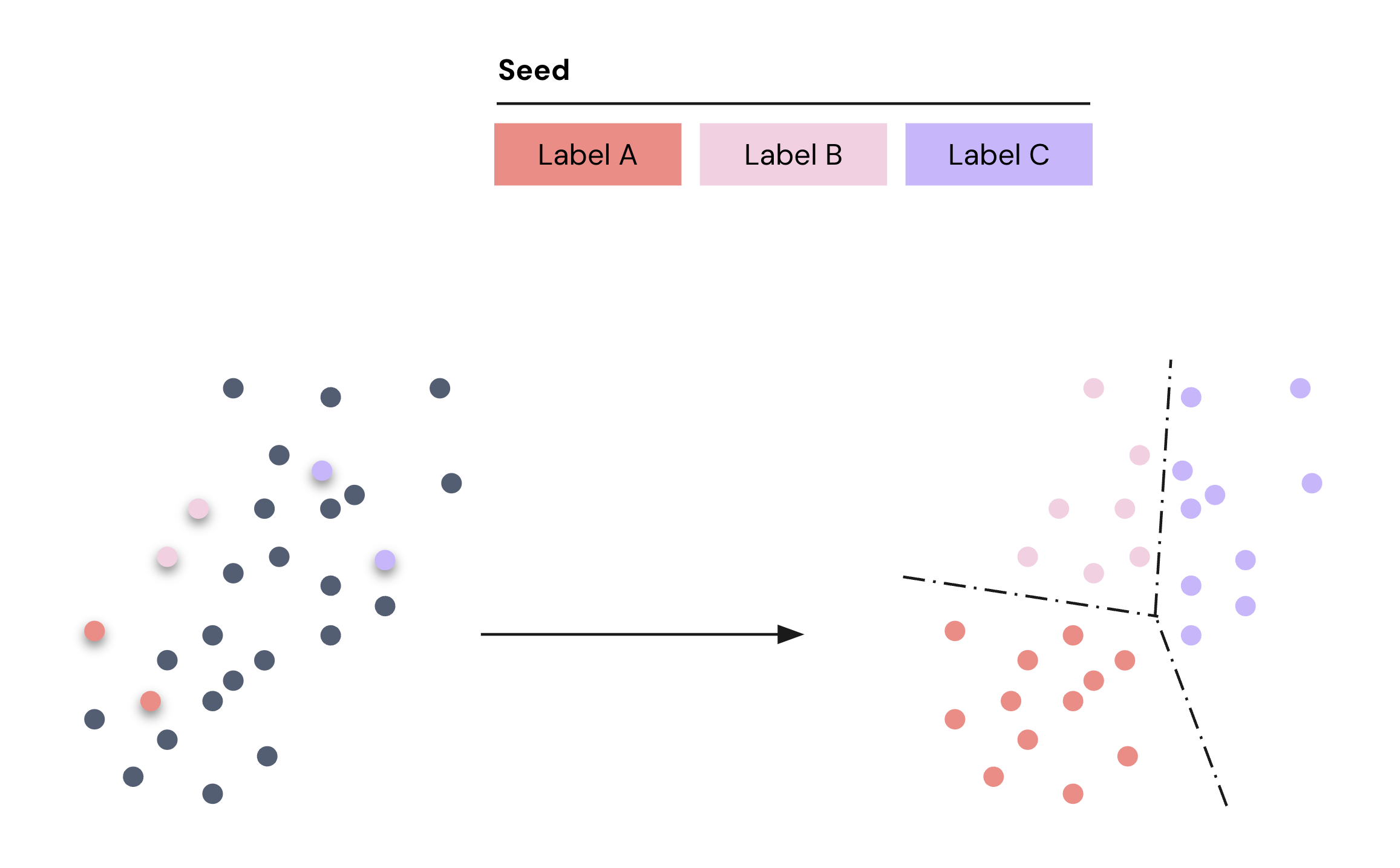
Deploying a Classification Cohort
A Classification Cohort is created from a Classification Model by first choosing a confidence threshold and then selecting the label for which the publisher would like to create a Classification Cohort.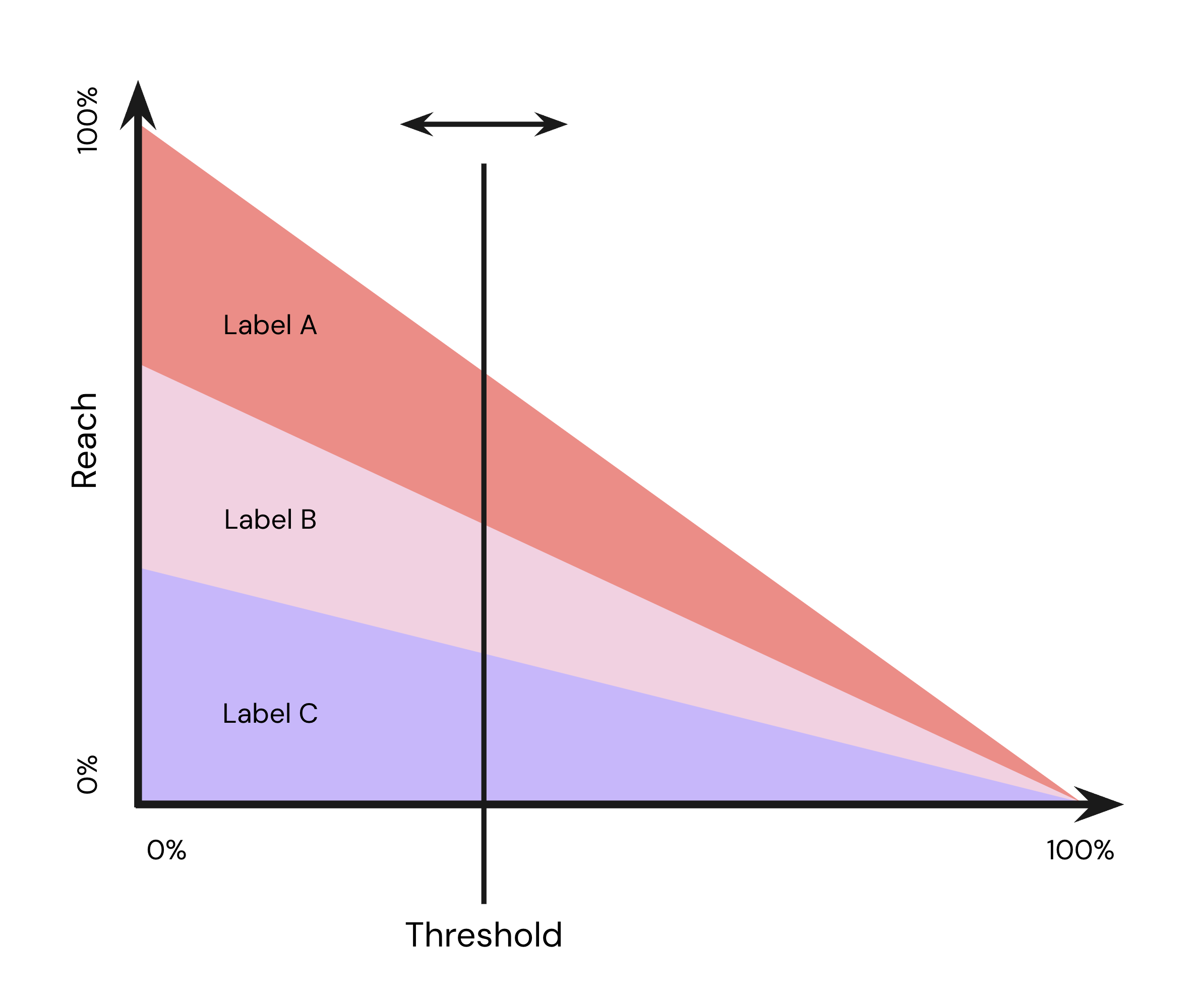
Activating a Classification Cohort
Once a Classification Cohort is deployed, the Permutive SDK manages the evaluation of users arriving on your sites and apps against the Classification Cohort to determine whether they meet the minimum threshold to fall into the label. To evaluate a user, the model uses the set of custom cohorts the user belongs to and predicts a level of confidence that the user falls into the label—if the confidence meets or exceeds the threshold for the Classification Cohort, then the user is deemed to fall into the cohort.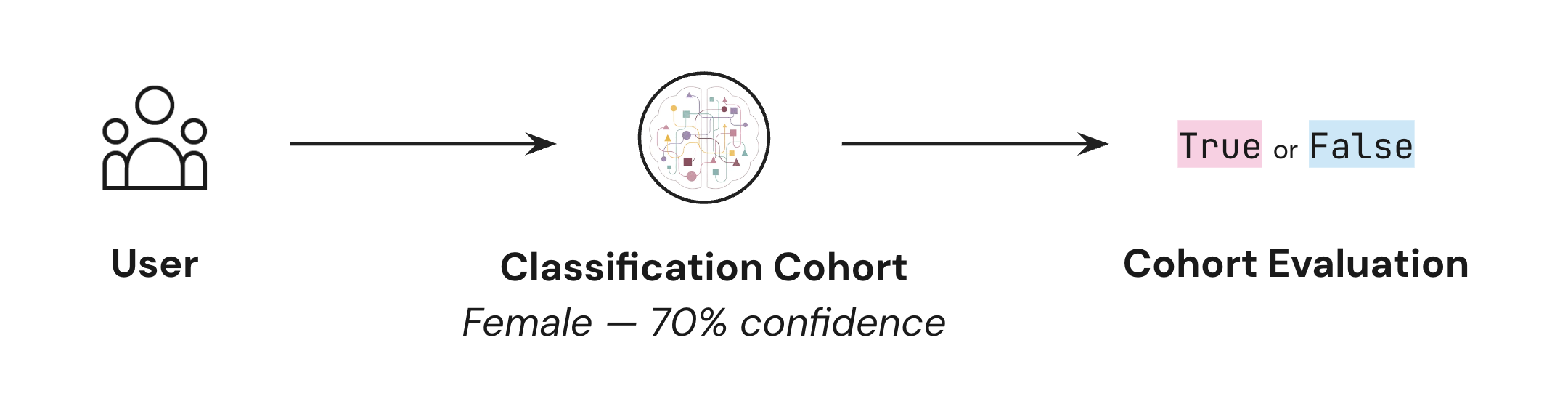
Guides
Step-by-step instructions for working with Classification Cohorts.Creating Classification Models
Creating Classification Cohorts
Viewing Classification Cohorts
Troubleshooting
Classification Model is stuck 'In Progress'
Classification Model is stuck 'In Progress'
- Wait 24-48 hours after creating your seed cohorts to ensure they have accumulated sufficient users before creating a Classification Model
- Verify that each cohort in your seed dataset has at least 1,000 users
- If the issue persists after 12 hours, contact Support for assistance
Classification Cohort has low reach or accuracy
Classification Cohort has low reach or accuracy
- Review the confidence threshold for your Classification Cohort
- Adjust the threshold to balance reach and accuracy for your use case
- Create multiple cohorts from the same model at different confidence thresholds to test performance
- Remember: At 0% confidence, the model assigns labels to 100% of users but predictions are essentially random; at 100% confidence, only users in the seed dataset are classified
Classification Cohort not activating to destination
Classification Cohort not activating to destination
- Verify the cohort is enabled for activation in the dashboard
- Check that the activation destination (Google Ad Manager or Xandr) is properly configured
- Allow time for the SDK to rebuild and deploy (this can take several minutes)
- Confirm the platform where you’re attempting activation is supported
Environment Compatibility
Core Product
Classification Cohorts functionality is supported on the following platforms:Insights
Activation
Classification Cohorts can be activated against the following destinations:Dependencies
Classification Cohorts rely on the following products being configured for your organization and workspace.Limits
Classification Cohorts adhere to the following product SLAs.Feature Limits
Performance Limits
Usage Limits
FAQ
How long does it take to train a Classification Model?
How long does it take to train a Classification Model?
What's the difference between partner data and first-party data for Classification Models?
What's the difference between partner data and first-party data for Classification Models?
Can I use third-party data in my Custom Cohorts for training?
Can I use third-party data in my Custom Cohorts for training?
How do I choose the right confidence threshold?
How do I choose the right confidence threshold?
- Higher thresholds (70-90%): More accurate predictions but lower reach. Use when precision is critical.
- Medium thresholds (50-70%): Balanced accuracy and reach. Good starting point for most use cases.
- Lower thresholds (30-50%): Greater reach but lower confidence in predictions. Use when maximizing audience size is important.
How many Classification Models and Cohorts can I create?
How many Classification Models and Cohorts can I create?
- 10 active Classification Models at any time
- 30 active Classification Cohorts at any time
Why do I need at least 1,000 users per Custom Cohort?
Why do I need at least 1,000 users per Custom Cohort?
Where can Classification Cohorts be activated?
Where can Classification Cohorts be activated?
- Google Ad Manager (GAM)
- Xandr (AppNexus)
Can I edit a Classification Model after it's been trained?
Can I edit a Classification Model after it's been trained?
Does a trained model use cohorts created after it was trained?
Does a trained model use cohorts created after it was trained?
Which cohorts does a Classification Model use as inputs?
Which cohorts does a Classification Model use as inputs?
- Custom Cohorts (excluding those using third-party data)
- Contextual Cohorts
- Standard Cohorts
What happens to my Classification Cohorts if I delete the model?
What happens to my Classification Cohorts if I delete the model?