

Guides
Issues
FAQ
Overview
Lookalike Modeling is a machine-learning (ML) process used to expand your audience reach by finding users who behave similarly to a set of “seed users.” By identifying patterns of behavior across your first-party data, Permutive can predict the likelihood of other users belonging to a specific interest or demographic group, even if they haven’t explicitly performed the actions that define the seed segment. Unlike traditional lookalike models that rely on static, batch-processed data, Permutive’s lookalike models operate in real-time. They compute granular likelihood scores for every user on every page view, allowing for immediate activation and highly precise targeting.Why Use Lookalike Models?
Expand Niche Audiences — Increase the reach of high-value but small first-party segments to meet campaign delivery goals without sacrificing relevance. Find New Customers — Expand your high-value first-party segments to find “likely converters” among your own audience, driving better campaign performance for your advertiser partners. Real-Time Activation — Score and activate users immediately from their first page view, ensuring no targeting opportunities are missed.Concepts
Definitions
- Seed Segment: The original “source” cohort of users that the model learns from. This is typically a high-quality, publisher first-party segment.
- Feature Space: The set of all custom cohorts in your workspace that the model uses as inputs to identify behavioral patterns.
- Similarity Score (Propensity): A probability between 0 (0%) and 1 (100%) assigned to each user, representing how closely their behavior matches the seed segment.
- Precision (Confidence): A threshold chosen by the user to determine which users to include in a lookalike cohort based on their similarity score.
- Reach: The estimated number of unique users that will be included in a lookalike cohort at a given precision level.
Workflows
Creating a Lookalike Model
To start expansion, you first define a seed segment from your existing publisher cohorts. Permutive then uses logistic regression to analyze the behavioral patterns (cohort memberships) of users in that seed. The model learns which other cohorts are strong predictors of being in the seed segment.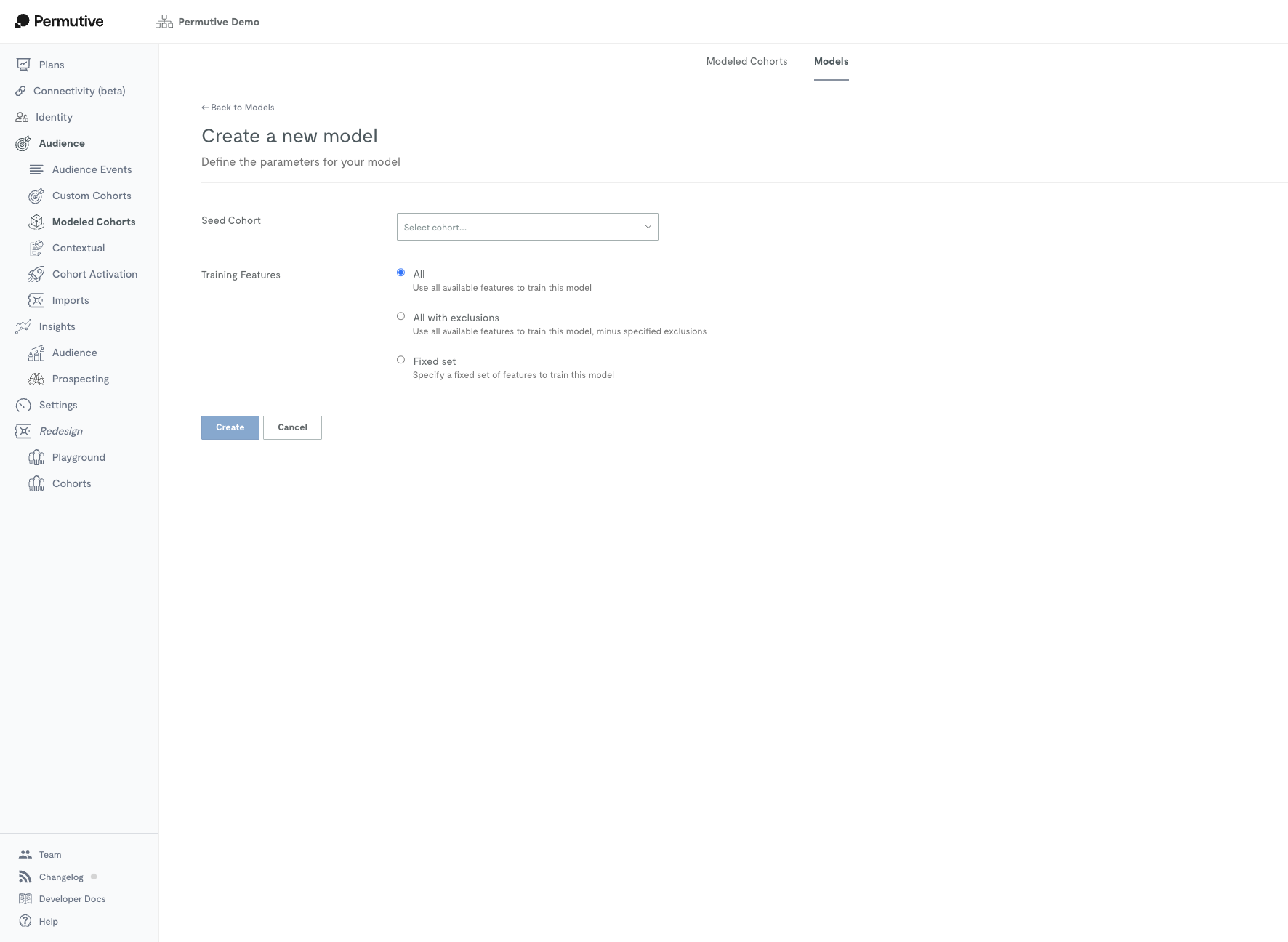
Evaluating Model Performance
Once trained, the model produces a “Precision vs. Reach” curve. This curve shows the trade-off between how similar the users are to your seed (Precision) and how many users you can reach (Reach). You can also inspect the “weights” assigned to different cohorts to see what behavioral traits the model found most significant.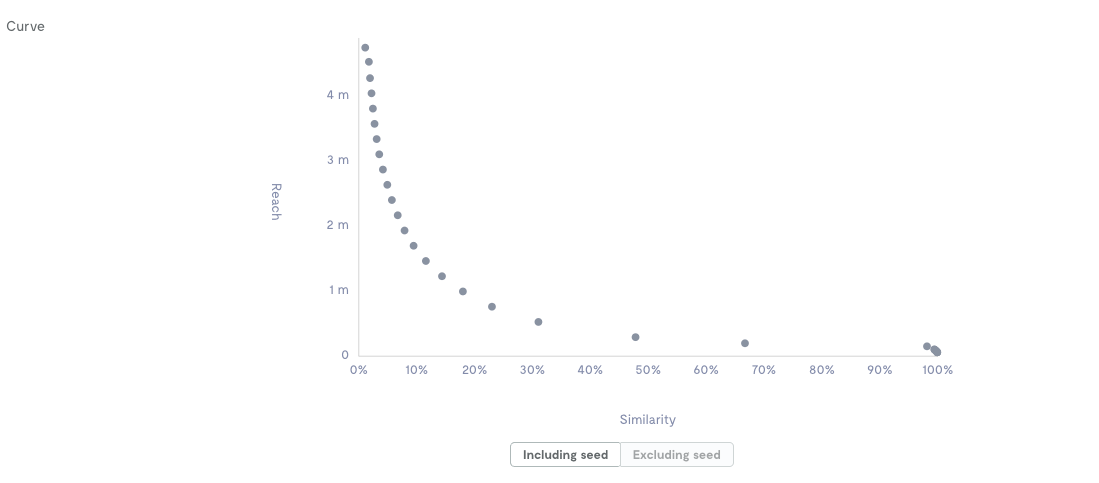
Activating Lookalike Cohorts
From the model’s curve, you can create one or more lookalike cohorts by selecting a specific similarity threshold. These cohorts can then be activated programmatically via SSPs/DSPs or directly in your publisher ad server, just like any other Permutive cohort.Guides
Step-by-step instructions for working with Lookalike Models.Creating a Lookalike Model
Guide for setting up a new lookalike model, including seed selection and configuration options like include/exclude segments.
Creating Lookalike Cohorts
Guide for using the precision vs. reach curve to create and name lookalike cohorts for activation.
Editing a Seed Segment
Guide for modifying the underlying seed segment and understanding when the model picks up the change.
Deleting a Model
Guide for removing a model and the impact on its associated lookalike cohorts.
Using Include/Exclude Segments
Guide for using advanced filtering to restrict the model’s training set or target population.
Validating Model Weights
Guide for interpreting model weights to ensure the machine learning logic aligns with behavioral expectations.
Troubleshooting
Seed users aren't showing up in the lookalike audience
Seed users aren't showing up in the lookalike audience
Lookalike modeling is probabilistic, not deterministic. If seed users don’t exhibit strong, shared behavioral patterns across your other cohorts, the model may not be able to confidently group them together.Solution: Ensure your workspace has a diverse set of custom cohorts (at least 10-20) to provide enough “features” for the model to learn from.
The lookalike audience is smaller than expected
The lookalike audience is smaller than expected
This often happens if the seed group is too small, too diverse, or if overly restrictive “Include/Exclude” settings are used.Solution: Check that your seed segment has at least 1,000 unique users per day. Review any “Include” or “Exclude” segments to ensure you aren’t accidentally filtering out too much of the target population.
Model training is stuck 'In Progress' or fails
Model training is stuck 'In Progress' or fails
Models typically take up to 2 hours to train. Common causes of failure include:
- Insufficient Seed Data: The seed segment has too few users.
- Over-restricted Include Segments: Using only a single or a handful of cohorts in “Include Segments” doesn’t provide enough features for the model to build.
Low similarity scores (e.g., only up to 40%)
Low similarity scores (e.g., only up to 40%)
If the model curve stops at a low similarity percentage, it means the model couldn’t find a group of users that strongly and uniquely match the seed’s behavior compared to the rest of the audience.Solution: Check for “overlapping” cohorts that are too similar to the seed, which can confuse the model. Try expanding your feature space with more distinct behavioral cohorts.
Environment Compatibility
Core Product
Activation
Lookalike cohorts can be activated across all standard Permutive destinations, including:- Google Ad Manager (GAM)
- Xandr
- Magnite
- Index Exchange
- FreeWheel
Dependencies
Limits
Feature Limits
Performance Limits
Usage Limits
FAQ
How many segments do I need to create a model?
How many segments do I need to create a model?
There is no hard minimum, but we recommend at least 10 segments. Having more segments increases the chance of the model finding meaningful relationships between behaviors.
What happens if I delete the seed segment?
What happens if I delete the seed segment?
The model will continue to work for a while but will eventually become less accurate as it can no longer learn from new seed data. It is recommended to keep the seed segment active.
Can I use third-party data in my models?
Can I use third-party data in my models?
Yes, if your workspace has third-party data enabled, it can be included in the feature space to significantly improve model accuracy.
How do I know if my model is 'good'?
How do I know if my model is 'good'?
You can validate a model by checking the weights. For example, if a “Sports Lover” model gives a high positive weight to a “Rugby” cohort, the model is likely learning correctly.
Changelog
2025
February 2025- Added support for Lookalike models in the Rust query runtime for improved performance.
- Improved SDK handling of model state to prevent indefinite processing in edge cases.
2024
December 2024- Enabled the use of Connectivity-Imported cohorts as seeds for lookalike modeling.
For detailed changelog information, visit our
Changelog.