

Overview
This guide explains how to create Custom Cohorts that target users based on their Internet Service Provider (ISP). ISP information is automatically collected from users’ IP addresses on every Pageview using Maxmind’s geo-location database.Prerequisites:
- Permutive Web SDK deployed (ISP data is collected automatically)
- Access to the Permutive Dashboard with cohort creation permissions
Steps
1
Navigate to Custom Cohorts
In the Permutive Dashboard, go to Custom Cohorts and click + Add Cohort.
2
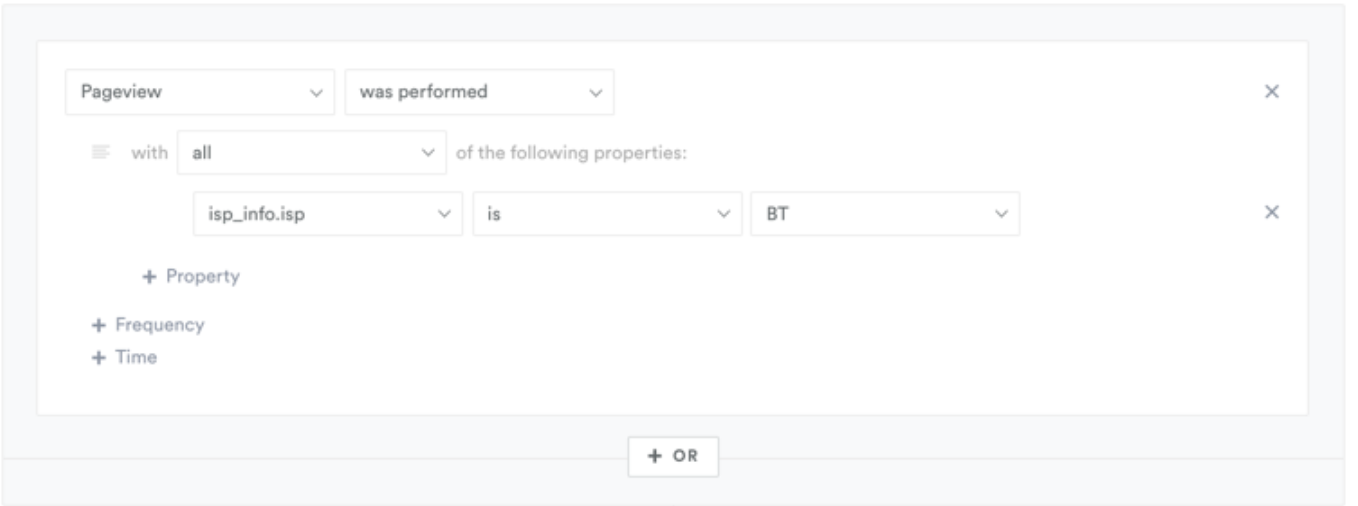
Select Pageview event
In the Cohort Builder, select Pageview as your event.
3
Add ISP property filter
Add a property filter for
isp_info.isp.4
Set ISP value
Set the value to the ISP name you want to target (e.g., “BT”, “Comcast”, “AT&T”).
5
Configure additional criteria
Optionally add recency, frequency, or other conditions.
6
Save
Calculate the audience size and save the cohort.
Platform Support
Next Steps
Create Basic Cohorts
Learn cohort creation fundamentals
Back to Custom Cohorts
Return to product overview