

Guides
Issues
FAQ
Overview
Identity Graph is Permutive’s core identity management system that collects, stores, and links identifiers to build a unified view of your users across domains, devices and sessions. All events in Permutive are tracked against users, each assigned a unique Permutive ID. The Identity Graph enables publishers to assign first and third party identifiers to track user events across devices, domains, and platforms, creating a comprehensive identity resolution system. Identity Graph supports both user-level identifiers (for individual users) and user group-level identifiers (for households or other groupings), allowing you to build sophisticated identity relationships for audience targeting, insights, measurement, and activation use cases.Why Use Identity Graph?
Unified User View Across Devices — Link identifiers from different devices, sessions, and domains to create a single customer view, enabling more accurate and multi-dimensional audience targeting and measurement. Cross-Domain Identity Resolution — Resolve user identities across multiple domains within your organization, improving the accuracy of cross-domain audience targeting and analytics. Flexible Identity Management — Support for multiple identifier types (cookies, hashed emails, third-party IDs) with configurable priority for resolution, giving you control over how identities are resolved. Foundation for Advanced Use Cases — Power audience segmentation, activation, routing, and data collaboration by providing a reliable identity resolution layer that connects user data across the Permutive platform with data vendors and advertising partners. Household-Level Targeting — Support for user groups (such as households) enables segmentation, targeting, activation and measurement at the household level, expanding your audience reach and measurement capabilities.Concepts
Definitions
- Identity Graph: A database that holds customer profiles and all the known identifiers that correlate with individual consumers, enabling identity resolution across domains, devices and sessions.
- Permutive ID: A unique, Permutive-generated identifier assigned to each user or user group entity in the identity graph.
- Identifier: A type of first-party or third-party identity set up in the Permutive platform (e.g.,
appnexus,email_sha256,user_id). Identifiers can be designated as either user-level or user group-level. - Identity: A specific instance of an identifier, consisting of an identifier type and a value (the identifier string itself). For example,
appnexus: abc123oremail_sha256: 2c26b46b68ffc68ff99b453c1d30413413422d706483bfa0f98a5e886266e7ae. - Alias: A legacy term for Identity (used in our previous documentation). An alias consists of an identifier type and a value and can reference either a User or Group entity.
- Entity: A fundamental object in the identity graph that serves as a generic container. An Entity can be one of two types: a User or a Group.
- User: A type of Entity that represents an individual user within the system. Each User has a unique Permutive-generated identifier (PermutiveUserId) and can be linked to one or more Groups.
- Group: A type of Entity that represents a collection of individual Users. The primary use case is a household. A Group has its own unique identifier (PermutiveUserGroupId) and can be referenced by its own set of Identities.
- Identity Resolution: The process of linking multiple identifiers to the same Permutive ID, creating a unified view of a user across different touchpoints.
Standard Identifiers
Permutive supports the following standard identifier types out of the box. You can also create custom identifiers to suit your specific needs.Auto-collected identifiers can be automatically captured by the Permutive SDK when available in the user’s environment, if this option is configured for the identifier in the Permutive dashboard. All other identifiers must be passed explicitly via the identify endpoint or imported via Connectivity.
Workflows
Configuring Identifiers in the Dashboard
The Identity Graph dashboard allows you to view, add, and manage identifiers for your workspace. Navigate to Identity → Identifiers to see all configured identifiers, view metrics about their scale and usage, and manage identifier settings. You can add new custom identifiers, view identifier details including volume and coverage metrics, and see where each identifier is being used across the Permutive platform.Adding Identities via the Identify Endpoint
The/identify endpoint is one of the methods for adding identities to your Identity Graph. When called, it accepts a Permutive user ID (or generates a new one if none is provided) and a prioritized list of identities. The system reads through the provided identities in priority order until it finds one that already exists in the graph, then links all provided identities to that Permutive ID. If no match is found, all identities are linked to the provided or newly generated Permutive ID. For more information on the /identify endpoint, please consult our “Adding Identities via Identify Endpoint” guide or our API documentation.
Viewing Identifier Details
The Identifier Details section provides comprehensive visibility into each identifier’s scale, coverage, and usage across the Permutive platform. This view shows volume and coverage metrics, compares identifier scale against your total universe, and visualizes where each identifier is being used (Connectivity, Audience Imports, Activations, Routing, Data Collaboration).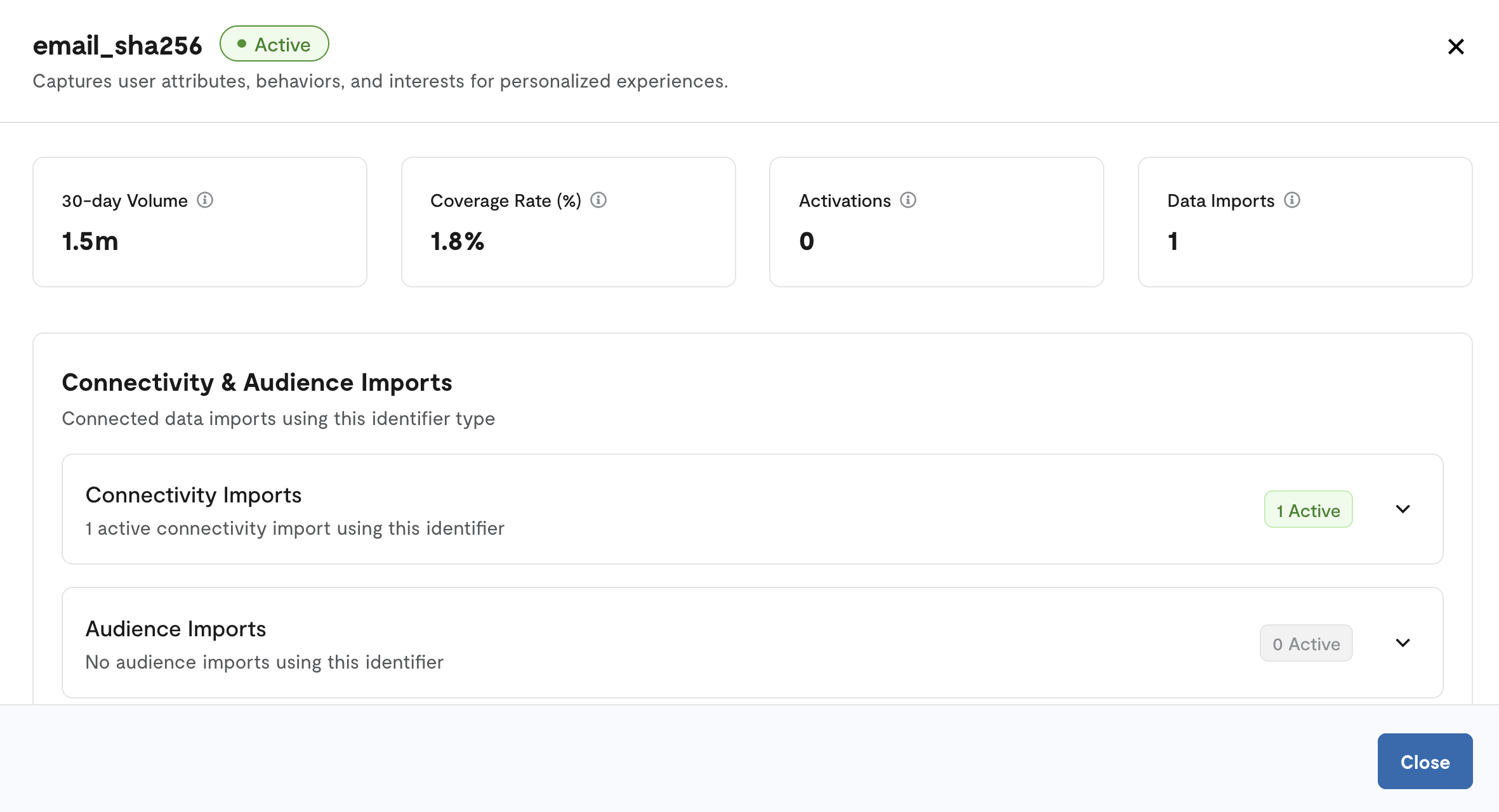
Importing Users, User Groups, and Memberships via Connectivity
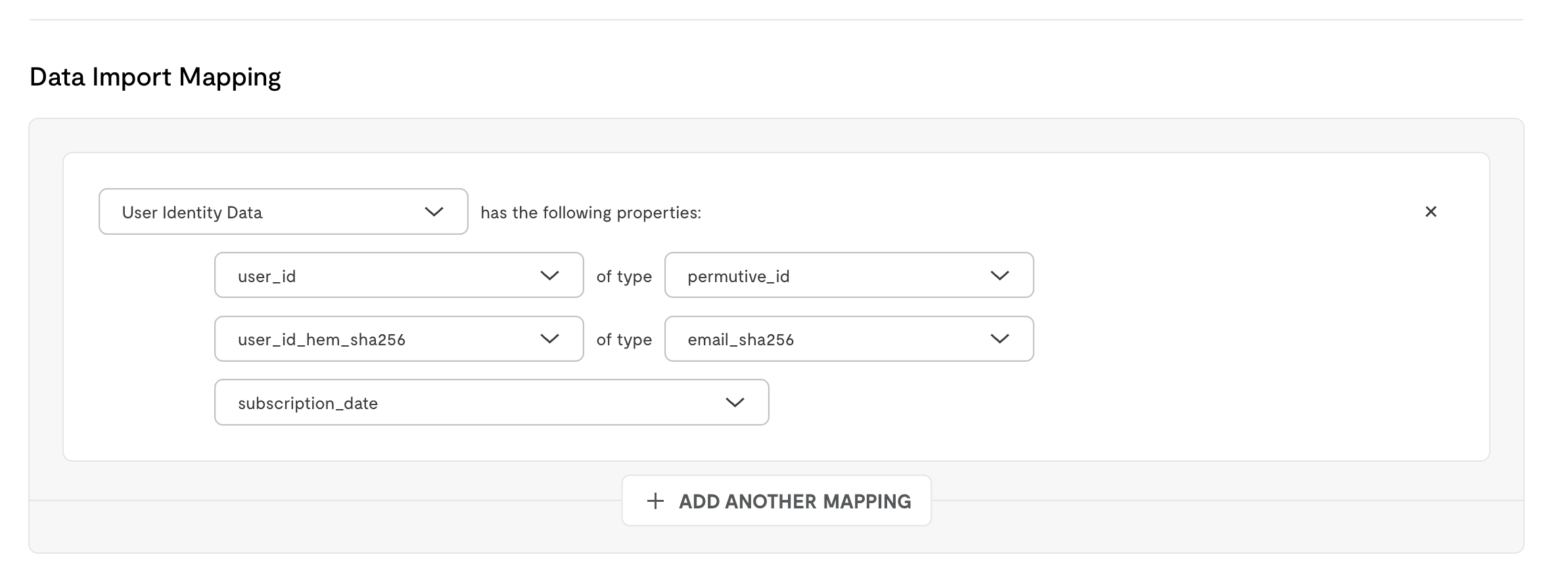
Connectivity is another method to add identities in your Identity Graph. Identity Graph supports importing users, user groups, and user group memberships (e.g., household relationships) via Connectivity. This allows you to bulk import identity data from your data warehouse, including:- User identities: Import user-level identifiers to build your identity graph
- User group identities: Import group-level identifiers (e.g., household IDs)
- Group memberships: Create relationships between users and groups for household-level identity resolution
Identity Resolution Process
When identities are added to the graph, the system performs identity resolution by checking if any provided identity already exists. If a match is found, all new identities are linked to the existing Permutive ID. This creates a unified view where multiple identifiers (e.g., a cookie ID and a hashed email) resolve to the same user profile.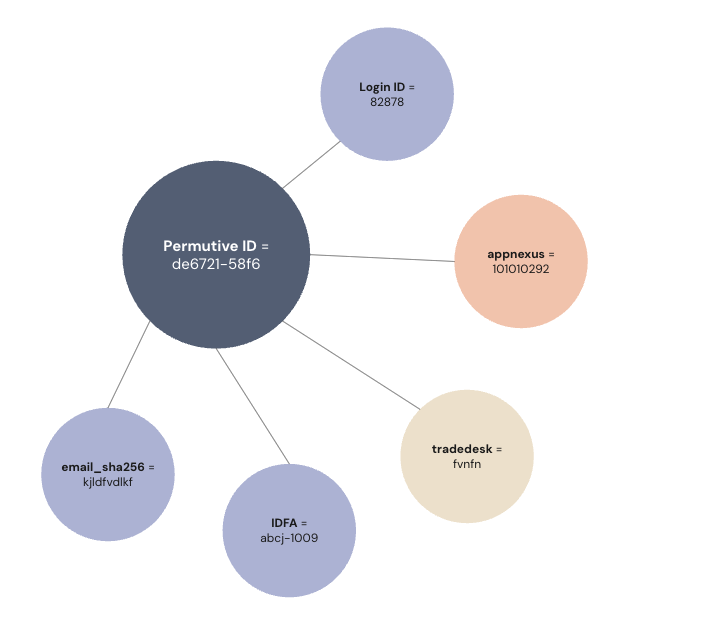
Guides
Step-by-step instructions for working with Identity Graph.Configuring Identifiers
Guide for adding, viewing, and managing identifiers in the Identity Graph dashboard, including custom identifier setup
Viewing Identifier Details
Guide for accessing and interpreting the Identifier Details page, including metrics analysis and usage visualization
Adding Identities via Identify Endpoint
Guide for implementing the /identify endpoint across Web, iOS, Android, and API platforms, including priority configuration
Importing User Group Memberships
Guide for setting up Connectivity imports for user group memberships, including data format requirements and configuration
Importing User Identity
Guide for setting up Connectivity imports for user identity data to link identifiers in the Identity Graph
Troubleshooting
Identity not resolving to expected Permutive ID
Identity not resolving to expected Permutive ID
If an identity is not resolving to the expected Permutive ID, this could be due to several reasons:
- The identity may not be properly configured in the Identifiers list (Identity > Identifiers)
- The identity may have a different identifier type or format than expected
- Priority order in the identify call may be causing a different resolution path
- Verify the identifier is configured in the dashboard (Identity > Identifiers)
- Check the identifier type and value format matches exactly what’s configured
- Review the priority order in your identify calls - identities are checked in priority order (0 = highest priority)
- Use Identity Insights to view overlap and resolution patterns
Identifier not appearing in dashboard
Identifier not appearing in dashboard
If an identifier you’ve configured is not appearing in the Identity Graph dashboard:
- The identifier may not have any associated identities yet (no data has been collected)
- There may be a delay in metrics calculation
- The identifier may have been removed from the identifier list
- Verify the identifier is still in your identifier list (Identity > Identifiers)
- Check that you’re sending identities with this identifier type via the identify endpoint
- Wait a few hours for metrics to update if you’ve recently added the identifier
- Contact Support if the identifier should have data but isn’t appearing
User group membership import failing
User group membership import failing
If your Connectivity import for user group memberships is failing:
- The required identifiers may not be configured (user-level and group-level identifiers must be set up)
- The data format may not match requirements (user_id, group_id, cursor columns)
- The identifier types in your import may not match the configured identifiers
- Verify both user-level and group-level identifiers are configured in Identity > Identifiers
- Check that your import table has the required columns: user_id, group_id, cursor (and optional is_deleted)
- Ensure the identifier types in your data match the namespace configured in Permutive
- Review Connectivity import logs for specific error messages
Low identity resolution rates
Low identity resolution rates
If you’re experiencing low identity resolution rates (identities not linking to existing Permutive IDs):
- Identifiers may not be prioritized correctly in identify calls
- Identity collection may be inconsistent across sessions or devices
- Identifier formats may be changing or inconsistent
- Review identifier priority in your identify calls - place the most stable, persistent identifiers first (priority 0)
- Ensure identify calls are made consistently across all user touchpoints
- Verify identifier formats are consistent (e.g., email hashing method)
- Use Identity Insights to analyze overlap patterns and identify gaps
Cannot add more than 5 identifier types
Cannot add more than 5 identifier types
If you’re unable to add more than 5 identifier types, you may need to upgrade to the Advanced ID Graph package.Solution: Contact your Customer Success Manager to discuss upgrading to Advanced ID Graph, which supports additional identifier types beyond the standard 5.
Environment Compatibility
Core Product
Dependencies
Limits
Feature Limits
Usage Limits
FAQ
What is the difference between an identifier and an identity?
What is the difference between an identifier and an identity?
An identifier is the type of identity (e.g.,
appnexus, email_sha256). An identity is a specific instance of an identifier, consisting of the type and a value (e.g., appnexus: abc123). You configure identifiers in the dashboard, and then send identities (identifier + value pairs) via the identify endpoint.How does identity resolution work?
How does identity resolution work?
When you call the identify endpoint with a list of identities, the system checks each identity in priority order (0 = highest priority) to see if it already exists in the graph. If a match is found, all provided identities are linked to that existing Permutive ID. If no match is found, all identities are linked to a new or provided Permutive ID. This creates a unified view where multiple identifiers resolve to the same user.
Can I use the same identifier type multiple times for a user?
Can I use the same identifier type multiple times for a user?
Currently, a User cannot have multiple identities of the same identifier type. For example, a user cannot have two different hashed emails. Each identifier type can only appear once per user entity.
What is the difference between user-level and group-level identifiers?
What is the difference between user-level and group-level identifiers?
User-level identifiers are used to identify individual users (e.g.,
email_sha256, appnexus). Group-level identifiers are used to identify user groups like households (e.g., household_id). When importing user group memberships, you must use a user-level identifier for the user_id and a group-level identifier for the group_id.How do I view metrics about my identifiers?
How do I view metrics about my identifiers?
Navigate to Identity > Identifiers in the dashboard to see high-level metrics for all configured identifiers. Click the ••• menu next to any identifier and select “View Details” to open the Identifier Details page, which shows volume, coverage, and usage metrics across the Permutive platform.
Can I delete an identifier?
Can I delete an identifier?
Yes, you can delete identifiers from the Identifiers page by clicking the ••• menu next to the identifier and selecting “Delete”. Note that deleting an identifier will prevent new identities of that type from being added, but existing identities will remain in the graph. Identity Insights may continue to show data for deleted identifiers for a period based on the reporting time range (Past 7 or Past 30 Days).
How do I import household or user group data?
How do I import household or user group data?
Use Connectivity to import user group memberships from your data warehouse. Set up a Connectivity import with columns for user_id, group_id, cursor, and optional is_deleted. Ensure both the user-level and group-level identifiers are configured in Identity > Identifiers before setting up the import.
How does Identity Graph relate to Identity Manager and Identity Insights?
How does Identity Graph relate to Identity Manager and Identity Insights?
Identity Graph is the core identity resolution system that collects and links identifiers. Identity Manager activates alternative IDs (like RampID, UID2) into the bidstream but does not ingest them into the Identity Graph by default. Identity Insights provides analytics dashboards that visualize your Identity Graph data, showing overlap, ingestion patterns, and domain resolution effectiveness.
Can I export my Identity Graph data?
Can I export my Identity Graph data?
Identity Graph data can be accessed through Routing, which provides a log of alias changes. For bulk export capabilities, contact Support to discuss your specific requirements.
Changelog
2025
December 2025- Enhanced Identity Graph with Identifier Details Page, providing visibility on identifier scale, coverage metrics, and usage across the Permutive platform (Connectivity, Audience Imports, Activations, Routing, Data Collaboration)
2024
August 2024- Identity Graph made generally available with support for user-level and group-level identifiers
- Initial release of Identity Graph with support for user-level identity resolution and the identify endpoint
For detailed changelog information, visit our Changelog.