

Guides
Issues
FAQ
Overview
Identity Manager enables publishers to integrate with third-party universal ID vendors, allowing encrypted user IDs (identity envelopes) to be passed into the programmatic bid stream. This no-code solution helps publishers increase CPMs and maximize programmatic revenue without requiring additional development resources. Identity Manager currently supports LiveRamp (RampID, PAIR ID, ATS Direct) and ID5 integrations with the Permutive SDK handling real-time ID retrieval and activation through Prebid.Why Use Identity Manager?
Maximize programmatic revenue with minimal effort — Identity Manager provides a no-code workflow to integrate alternative IDs, driving higher CPMs in programmatic auctions. Publishers can enable ID vendor integrations directly from the Permutive Dashboard without requiring engineering resources or additional code deployment. Reduce dependence on third-party cookies — As the industry moves away from third-party cookies, Identity Manager helps publishers maintain addressability through alternative identity solutions. By supporting multiple ID vendors (LiveRamp, ID5), publishers can maximize reach and yield across different buyer preferences. Control data exposure with geographic targeting — Publishers can restrict ID vendor integrations by geography based on user IP location. This allows you to balance incremental value against data exposure concerns, enabling IDs only in regions where they provide the most benefit.Concepts
Definitions
- Identity Envelope: An encrypted user ID provided by ID vendors (like LiveRamp, UID2, or ID5) that is passed into the bid stream. Advertisers pay to decrypt these envelopes during the bidding process.
- Alternative ID / Universal ID: Identity solutions designed to replace third-party cookies for programmatic advertising. These include deterministic IDs (requiring hashed email) and probabilistic IDs (using other signals).
- Prebid: The open-source header bidding solution used to pass identity envelopes to SSPs and DSPs during ad auctions.
- Permutive User ID Module: A Prebid module that acts as an interface between the Permutive SDK and Prebid, enabling Identity Manager integrations to work with your existing Prebid setup.
- Geo Rules: Configuration settings that restrict ID vendor integrations to specific countries based on the user’s IP location.
- Partner ID / Placement ID / API Key: Vendor-specific credentials provided by ID vendors (LiveRamp, UID2, ID5) that are required to enable their integration in Identity Manager.
Workflows
Discovering Available ID Vendors
Publishers access the Identity Manager catalog in the Permutive Dashboard to view available ID vendor integrations. The catalog displays supported vendors with options to connect or view details of enabled integrations.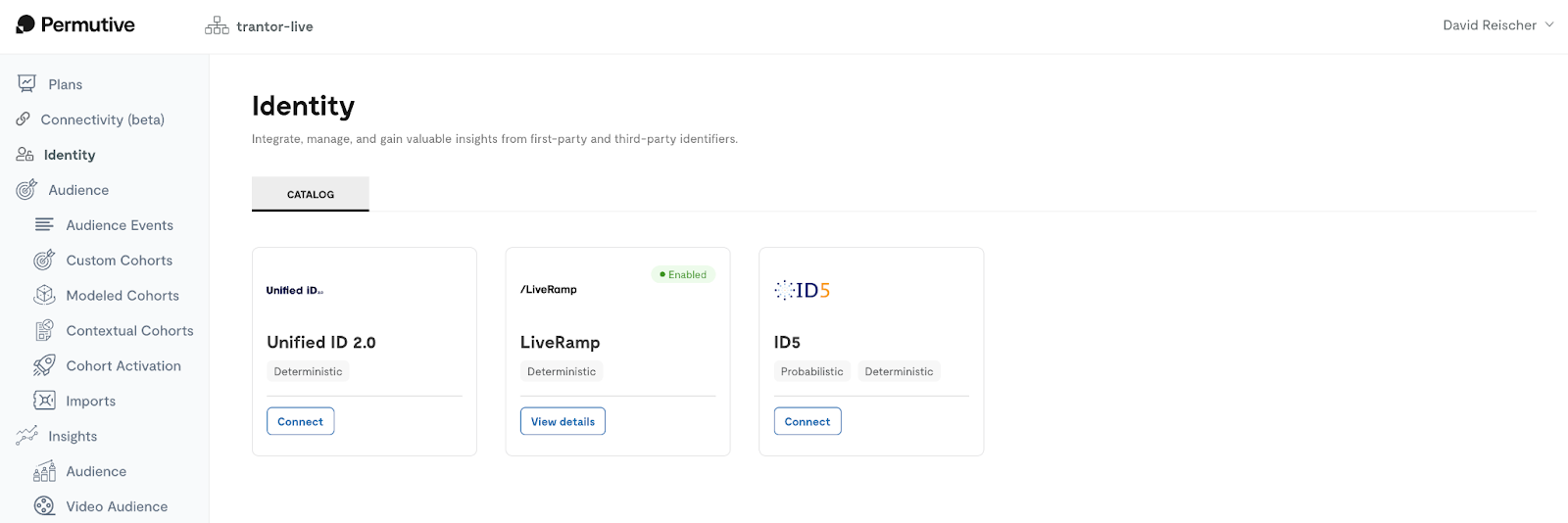
Configuring an ID Integration
Publishers configure ID vendor integrations by providing vendor-specific credentials (Partner ID, Placement ID, or API key) obtained from the ID vendor. Optional geo rules can be configured to restrict the integration to specific countries based on user IP location.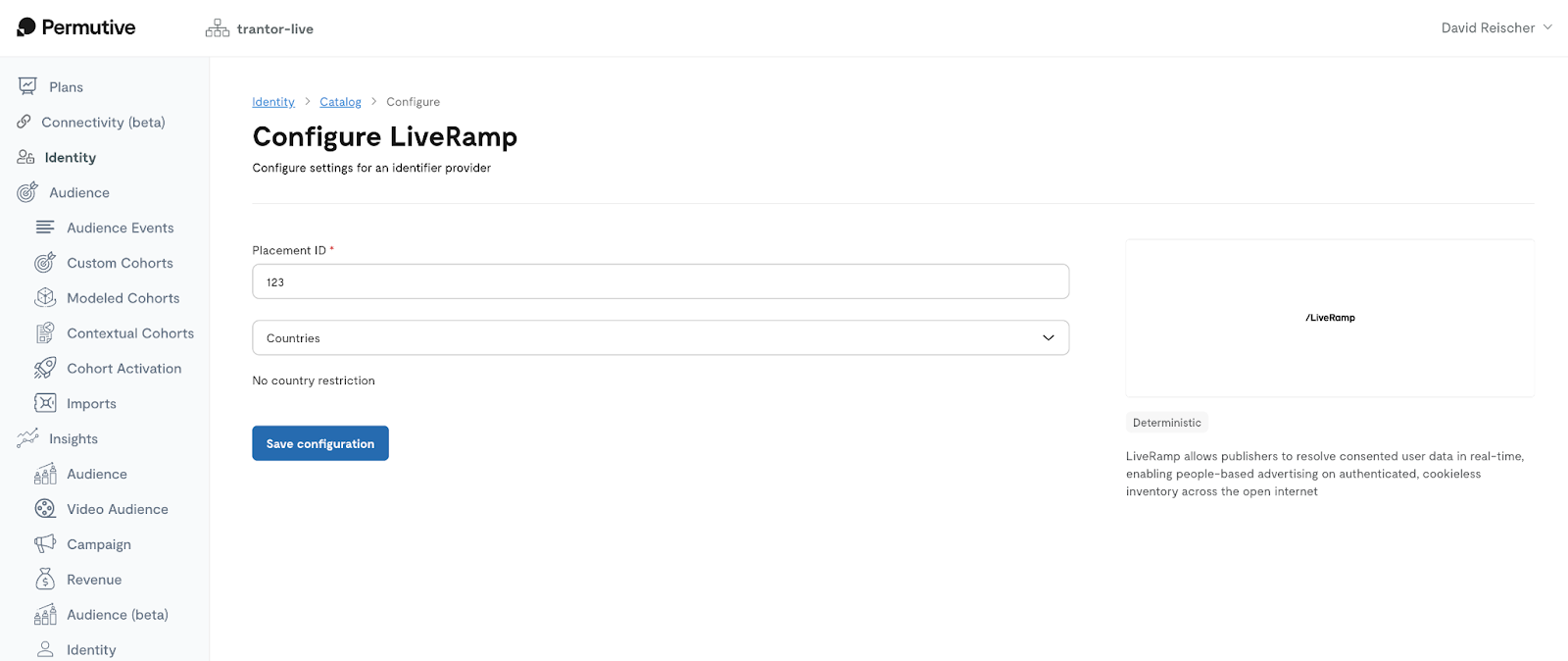
Activating IDs to Prebid
Once configured, the Permutive SDK automatically retrieves encrypted IDs from enabled vendors and passes them into the bid stream via Prebid. The Permutive User ID Module for Prebid handles the integration, ensuring IDs are available during ad auctions in real-time.Guides
Enabling Identity Manager for Your Organization
Identity Manager is available as part of the Permutive platform. To enable Identity Manager:Access Identity Manager
Review available vendors
Obtain vendor credentials
Set up Prebid module
Setting Up an ID Vendor Integration
To enable an ID vendor integration in Identity Manager:Navigate to Identity Manager
Select vendor
Enter credentials
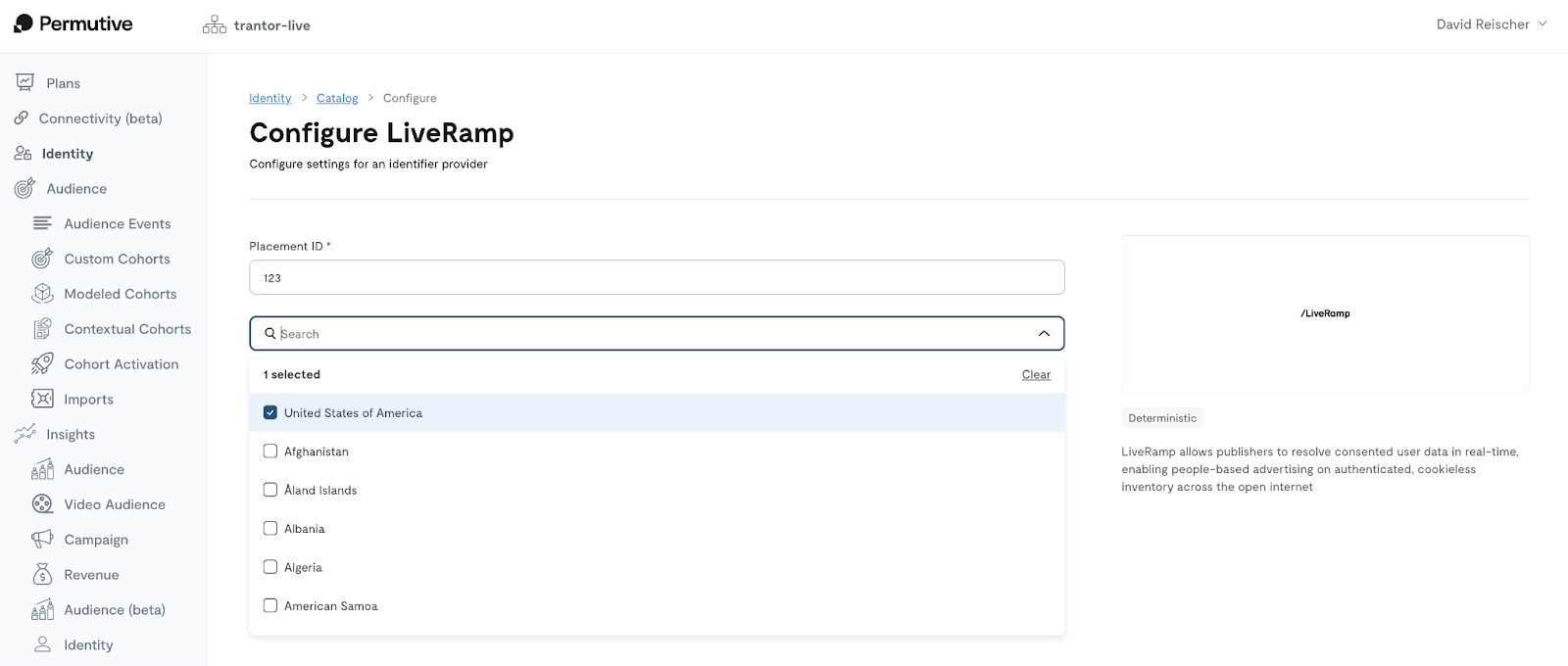
Configure geo rules (optional)
Save configuration
Managing ID Vendor Integrations
To manage existing ID vendor integrations:Navigate to Identity Manager
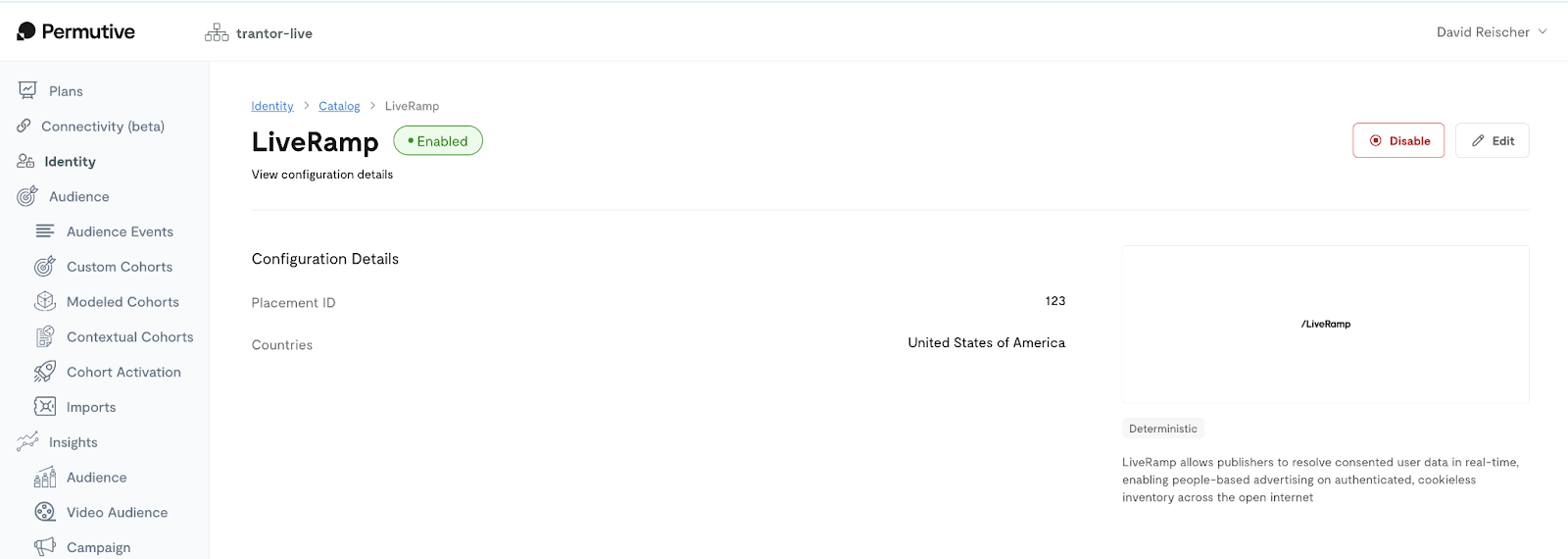
View integration details
Edit configuration
Disable integration (optional)
Setting Up the Permutive User ID Module for Prebid
The Permutive User ID Module for Prebid is required for Identity Manager to work. This module acts as an interface between the Permutive SDK and Prebid, passing identity envelopes into the bid stream.Determine your Prebid setup type
Add the module to Prebid
- Self-managed Prebid: Add the Permutive User ID Module to your Prebid configuration file. See the Permutive User ID Module documentation for implementation details.
- Managed Prebid: Contact your Prebid provider and request that they add the Permutive User ID Module to your setup.
Verify module is active
Troubleshooting
IDs are not appearing in the bid stream
IDs are not appearing in the bid stream
- Prebid module not installed: Verify the Permutive User ID Module is included in your Prebid setup
- Vendor not in CMP: Ensure the ID vendor is added to your consent management platform’s vendor list
- Geo restrictions: Check if geo rules are blocking the integration in the user’s location
- Vendor credentials incorrect: Verify the Partner ID / API key / Placement ID is correct in the integration configuration
- SDK timing: Ensure the Permutive SDK loads before Prebid runs to allow sufficient time for ID retrieval
Consent errors preventing ID retrieval
Consent errors preventing ID retrieval
- Vendor missing from CMP: The ID vendor must be listed in your consent management platform
- Required consent purposes not granted: Each vendor has specific TCF consent requirements
- Consent string not available: The Permutive SDK must be able to access the consent string
Integration configuration not saving
Integration configuration not saving
- Invalid credentials: The Partner ID / API key / Placement ID format may be incorrect
- Missing required fields: Ensure all required configuration fields are filled out
- Permissions issues: Verify you have permission to configure integrations in your workspace
No increase in CPMs after enabling integration
No increase in CPMs after enabling integration
- Insufficient time for testing: Allow several days to a week for meaningful data collection
- Low advertiser demand: Not all advertisers support alternative IDs; demand varies by market
- Geo restrictions limiting scale: Narrow geo rules may limit the number of users with IDs
- Hashed email availability: Deterministic IDs (LiveRamp, UID2) require hashed emails, which may not be available for all users
Environment Compatibility
Core Product
Identity Manager functionality is currently supported on the following platforms:Activation
Identity Manager currently supports activation through:- Prebid: All SSPs and DSPs that support alternative IDs through Prebid
- LiveRamp: RampID, PAIR ID, and ATS Direct segments
- [Coming Soon] UID2: Unified ID 2.0 framework participants
- ID5: ID5 Universal ID ecosystem
Dependencies
Identity Manager relies on the following products and configurations:Limits
Identity Manager adheres to the following product specifications and limits.Feature Limits
Performance Limits
Usage Limits
FAQ
Which ID vendors require hashed email?
Which ID vendors require hashed email?
Can I use Identity Manager without Prebid?
Can I use Identity Manager without Prebid?
Will Identity Manager work with my managed Prebid setup?
Will Identity Manager work with my managed Prebid setup?
How do geo rules work?
How do geo rules work?
Can I measure the impact of Identity Manager on my CPMs?
Can I measure the impact of Identity Manager on my CPMs?
Are these IDs added to the Permutive Identity Graph?
Are these IDs added to the Permutive Identity Graph?
What is the difference between RampID, PAIR ID, and ATS Direct?
What is the difference between RampID, PAIR ID, and ATS Direct?
- RampID: LiveRamp’s core encrypted identifier passed into the bid stream for programmatic activation
- PAIR ID: Google’s Publisher Advertiser Identity Reconciliation (PAIR) framework identifier, enabling privacy-focused first-party data matching with advertisers
- ATS Direct: LiveRamp’s Authenticated Traffic Solution for direct publisher-advertiser data matching
Can I add more ID vendors beyond the currently supported ones?
Can I add more ID vendors beyond the currently supported ones?
Changelog
2025
December 2025- Enhanced LiveRamp integration with local storage for RampID, PAIR ID, and ATS Direct segments
- Added PAIR ID activation to Prebid for Google’s Publisher Advertiser Identity Reconciliation framework
- Implemented region-aware TTL management (15 days for California, 30 days for other regions)
2024
November 2024- Initial release of Identity Manager with support for LiveRamp and ID5 integrations (UID2 coming soon)
- No-code integration workflow in Permutive Dashboard
- Geo-based restrictions for ID vendor integrations
- Prebid activation via Permutive User ID Module