

Guides
Issues
FAQ
Overview
Optimization enables publishers using Google Ad Manager (GAM) to understand cohort performance and identify opportunities to improve in-flight campaign delivery and CTR performance. The product provides insight into how individual cohorts are driving impressions and clicks for campaigns, along with AI-driven recommendations for cohorts that could improve campaign performance. Publishers can view their GAM campaigns, analyze how different cohorts are performing, and receive intelligent recommendations for new targeting opportunities—all without the time-consuming manual process of extracting and analyzing cohort-level data from GAM.Why Use Optimization?
Automate cohort performance analysis — Optimization automates the ingestion and analysis of cohort performance data from GAM, eliminating the need for time-consuming manual data extraction and analysis. Get instant visibility into how your cohorts are driving campaign delivery and performance. Receive AI-driven targeting recommendations — See recommendations for cohorts you’re not currently targeting that have a high propensity to click on your campaign or offer incremental user reach to drive increased delivery. The AI ensures recommendations align with your campaign’s targeting intent. Make data-driven optimization decisions — Understand which cohorts are contributing to campaign success and troubleshoot any delivery issues with cohort-level performance data including impressions, CTR, and viewability metrics.Concepts
Definitions
- Google Ad Manager (GAM): The ad server currently supported for the Optimization product. Publishers use GAM to set up and manage digital advertising campaigns. GAM is the primary source of truth for campaign impression, click, and viewability data.
- Order/Campaign: An Order in GAM (sometimes referred to as a campaign) represents a configuration for advertising delivery on publisher sites. For direct campaigns, an order includes all targeting criteria (ad units, sites, audiences) and usually hosts the campaign creative.
- Line Item: A sub-division of an Order in GAM that enables publishers to define more granular targeting strategies and delivery schedules within a campaign. Multiple Line Items are often used to test different audience targeting strategies or manage delivery of different creatives.
- Targeted Cohorts: Permutive cohorts that are explicitly set as targeting criteria for a campaign’s line items.
- Non-targeted Cohorts: Cohorts that are present when an impression is delivered but are not explicitly targeted for the campaign. These cohorts represent potential optimization opportunities.
- AI-based Recommendations: Intelligent suggestions for cohorts that could improve campaign delivery or CTR, generated using generative AI to ensure recommendations align with the campaign’s existing targeting intent.
Workflows
Viewing Campaign Performance
Publishers access the Optimization tool to see an overview of all GAM campaigns with key delivery and performance metrics. The Campaigns List provides aggregate metrics showing how Permutive cohorts are driving campaign delivery over the last 30 days.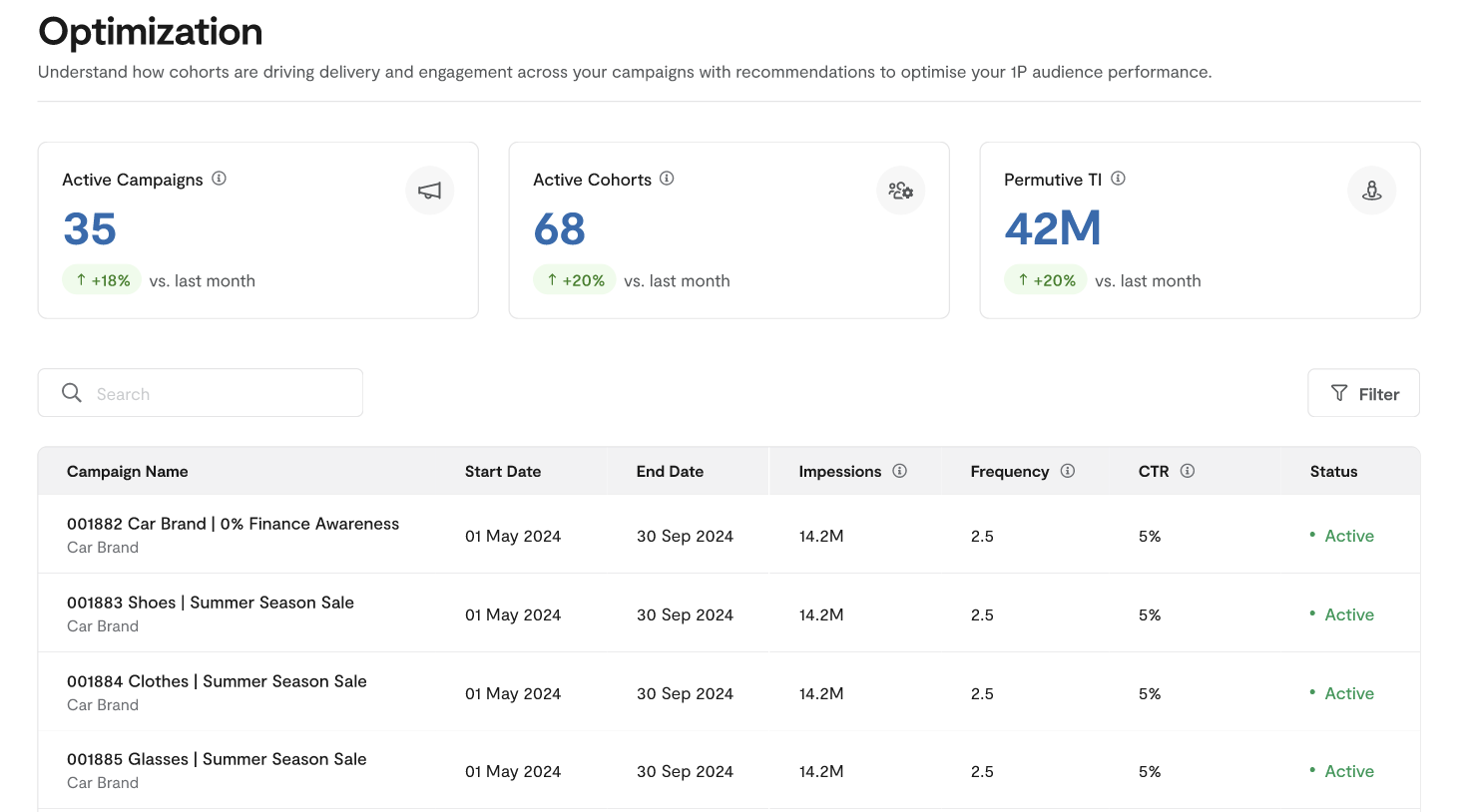
Analyzing Cohort Performance
After selecting a campaign, publishers can drill into cohort-level performance data. The Cohort Performance view shows which targeted cohorts are driving impressions and clicks, along with daily performance trends for the top-performing cohorts.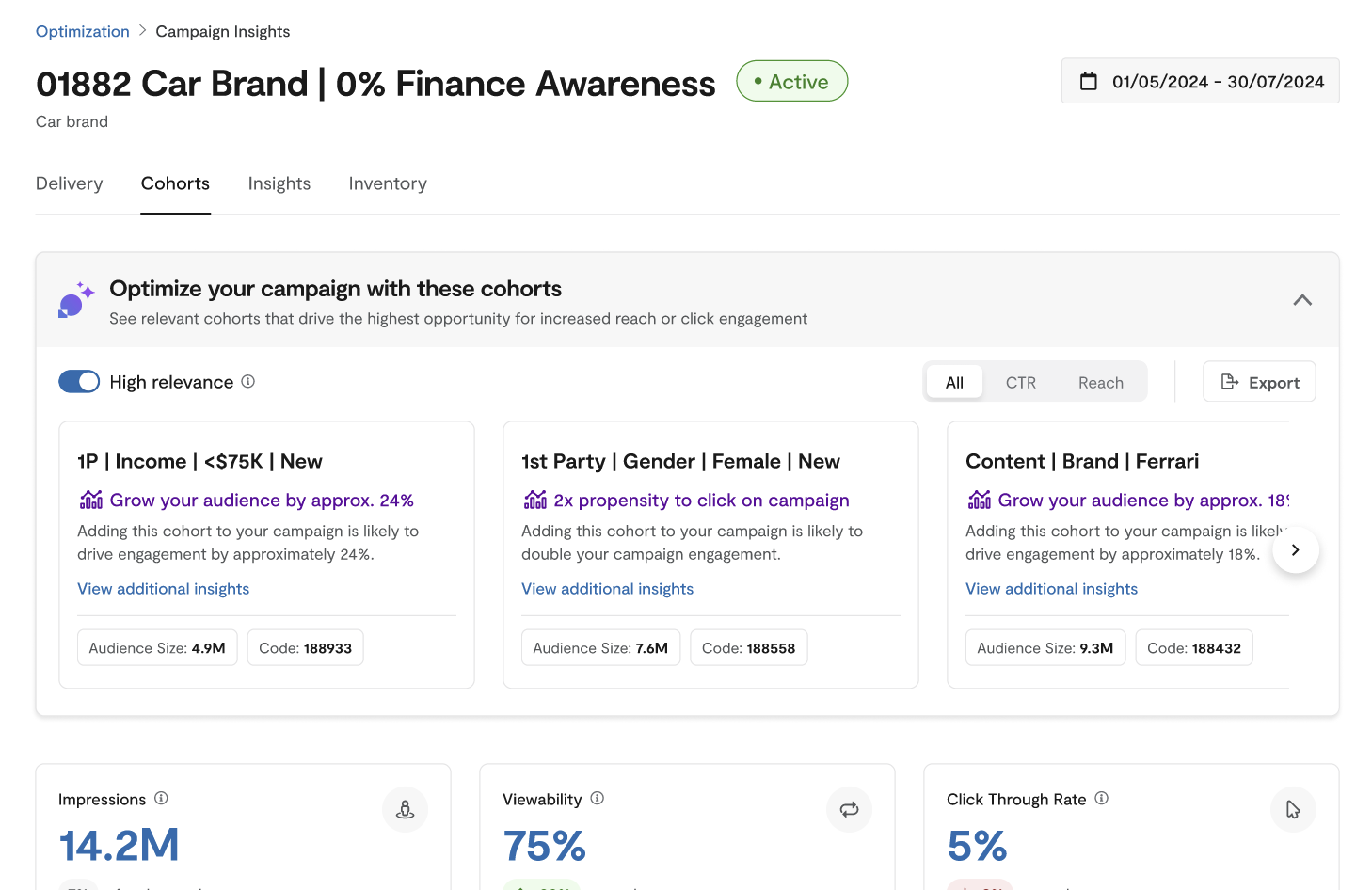
Using AI Recommendations
The AI-based recommendations feature suggests cohorts that are not currently targeted but show potential for improving campaign delivery or CTR. Publishers can filter recommendations by relevance and metric type, then view detailed information about each recommended cohort.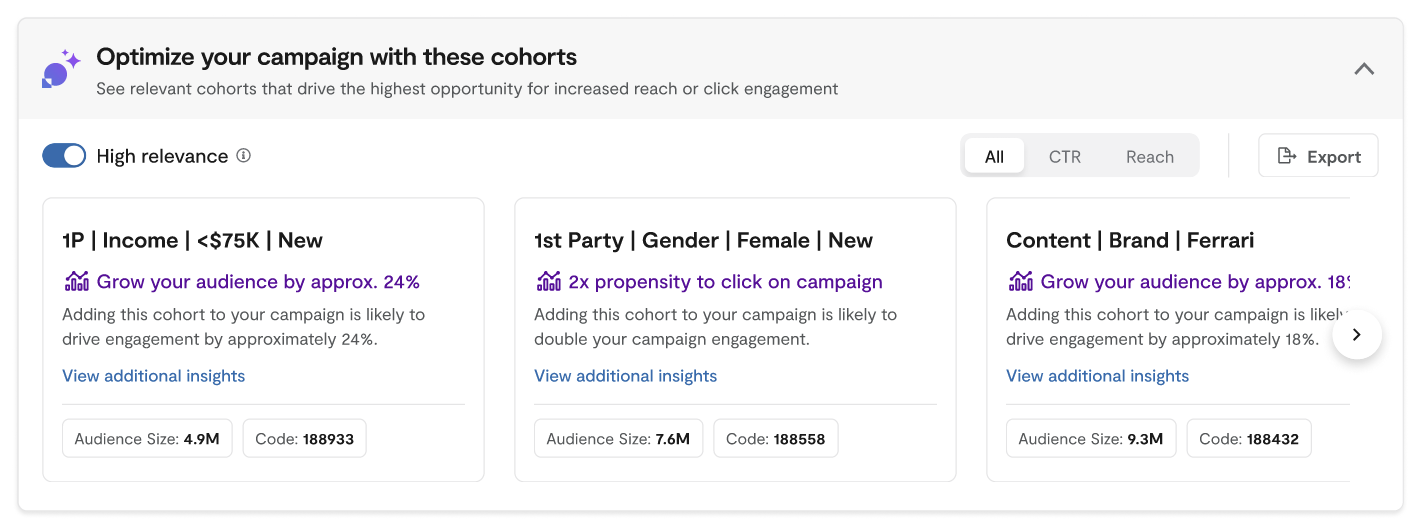
Key Features
Campaigns List
The campaign list page provides aggregated metrics across GAM orders along with a searchable list of your orders with key delivery and performance metrics.Aggregate Campaign Metrics
These tiles provide an overview of Permutive usage for campaign targeting over the last 30 days with comparisons to the prior 30-day period:Campaign List Table
The campaign list is searchable by advertiser name, order ID, and order name. You can filter by campaign status and sort columns.Cohort Performance
Once you click on a campaign, the Cohort Performance view provides detailed information for optimizing campaign performance.Campaign Header
View key information including order name, date range, and campaign status.Line Items Filtering
When running campaigns with multiple targeting strategies, use the line item filter to focus your analysis on specific line items within the order.Campaign KPIs
View overall performance metrics across the order or selected line items:- Impressions: Total impressions delivered since the order start date
- CTR: Average click-through rate achieved
- Viewability: Average percentage of viewable impressions
Targeted Cohorts Performance Table
See delivery and performance metrics for each cohort targeted across your order or selected line items:Daily Performance Chart
Track performance trends over time with a line chart showing impressions, CTR, and viewability for the top 5 cohorts. This helps identify the impact of optimizations and troubleshoot sudden changes in delivery or performance.AI-based Recommendations
The recommendations feature suggests cohorts that could improve campaign delivery or CTR performance.Recommendation Filters
- High Relevance: Enabled by default, uses generative AI to prioritize cohorts similar to those already targeted for the campaign. Disable to see a broader range of cohorts.
- Metric Toggle: Filter cohorts based on the metric you’re optimizing (delivery, CTR, or all).
Recommendation Cards
Each recommendation card shows:- Cohort Name: The name of the recommended cohort
- Campaign Opportunity: Description of the potential reach or CTR uplift opportunity
- Recommendation Details: Link to view more metrics and historical campaign information
- Unique Users: Number of unique users in the cohort (last 30 days)
- Cohort ID: The cohort identifier
Recommendation Details
Click on a recommendation to see additional metrics and historical campaign data: Cohort Metrics:Guides
Enabling Optimization for Your Organization
To access the Optimization product, you must meet the following eligibility criteria:- Have at least one GAM network integrated in your Permutive dashboard
- Have enabled the necessary permissions for API reporting (see GAM API Usage Guide)
- Have opted in to Permutive’s AI product development principles
- Have at least 100 cohorts activated to GAM (recommended for consistent recommendations)
Viewing Campaign Performance
Navigate to Optimization
Review aggregate metrics
Search for campaigns
Select a campaign
Filtering by Line Items
Open the campaign
Access line item filter
Select line items
Apply filter
Understanding AI Recommendations
Review recommendations
Apply filters
Explore recommendation cards
View recommendation details
Take action
Data Collection and Analysis
The Optimization product leverages several data sources and analytical models to provide accurate reporting and intelligent recommendations.GAM API Data Collection
Optimization ingests data from the GAM reporting API to provide accurate representation of campaign delivery and performance. When onboarding, Permutive backfills at least 3 months of campaign data so you can immediately use the product for live campaigns. Key points about GAM data:- Data is collected daily, so impression counts may not exactly match real-time GAM UI data
- For the most up-to-date metrics, refer to GAM directly
- Data is retained over time, enabling access to historical campaign information
Cohort User Metrics
For metrics such as unique user calculations, overlap, and indices, Optimization leverages SDK event data via the insights architecture. This data is calculated over the last 30 days, making it most relevant for analyzing in-flight campaigns.Troubleshooting
Campaign not appearing in Optimization
Campaign not appearing in Optimization
GAM API permissions issues
GAM API permissions issues
- Access the interface: Ad Exchange, Delivery, Overview
- Define and deliver ads: Ad units, placements, and key-values (all Permutive-related key-values need to be reportable)
- Orders and line items (with appropriate team assignments if Teams feature is used)
- Reports: Ad exchange reports, Ad manager reports
- User network settings: Change history
Video campaigns not appearing
Video campaigns not appearing
Network code mapping issues
Network code mapping issues
Data discrepancies between Optimization and GAM
Data discrepancies between Optimization and GAM
No AI recommendations appearing
No AI recommendations appearing
Environment Compatibility
Core Product
Ad Server Support
Dependencies
Limits
Feature Limits
Performance Limits
Usage Limits
FAQ
What ad servers are supported?
What ad servers are supported?
Why don't I see all my campaigns?
Why don't I see all my campaigns?
How often is data updated?
How often is data updated?
Can I use this for video campaigns?
Can I use this for video campaigns?
What permissions does Permutive need in GAM?
What permissions does Permutive need in GAM?
How many cohorts do I need for AI recommendations?
How many cohorts do I need for AI recommendations?
How does the AI determine relevant recommendations?
How does the AI determine relevant recommendations?
Can I configure which cohorts appear in recommendations?
Can I configure which cohorts appear in recommendations?