> ## Documentation Index
> Fetch the complete documentation index at: https://docs.permutive.com/llms.txt
> Use this file to discover all available pages before exploring further.
# Identity Manager
> Activate alternative IDs into the bid stream to maximize programmatic yield.
export const NoBadge = () => {
return
No
;
};
export const YesBadge = () => {
return
Yes
;
};
## Overview
**Identity Manager** enables publishers to integrate with third-party universal ID vendors, allowing encrypted user IDs (identity envelopes) to be passed into the programmatic bid stream. This no-code solution helps publishers increase CPMs and maximize programmatic revenue without requiring additional development resources.
Identity Manager currently supports LiveRamp (RampID, PAIR ID, ATS Direct) and ID5 integrations with the Permutive SDK handling real-time ID retrieval and activation through Prebid.
## Why Use Identity Manager?
**Maximize programmatic revenue with minimal effort** — Identity Manager provides a no-code workflow to integrate alternative IDs, driving higher CPMs in programmatic auctions. Publishers can enable ID vendor integrations directly from the Permutive Dashboard without requiring engineering resources or additional code deployment.
**Reduce dependence on third-party cookies** — As the industry moves away from third-party cookies, Identity Manager helps publishers maintain addressability through alternative identity solutions. By supporting multiple ID vendors (LiveRamp, ID5), publishers can maximize reach and yield across different buyer preferences.
**Control data exposure with geographic targeting** — Publishers can restrict ID vendor integrations by geography based on user IP location. This allows you to balance incremental value against data exposure concerns, enabling IDs only in regions where they provide the most benefit.
## Concepts
### Definitions
* **Identity Envelope**: An encrypted user ID provided by ID vendors (like LiveRamp, UID2, or ID5) that is passed into the bid stream. Advertisers pay to decrypt these envelopes during the bidding process.
* **Alternative ID / Universal ID**: Identity solutions designed to replace third-party cookies for programmatic advertising. These include deterministic IDs (requiring hashed email) and probabilistic IDs (using other signals).
* **Prebid**: The open-source header bidding solution used to pass identity envelopes to SSPs and DSPs during ad auctions.
* **Permutive User ID Module**: A Prebid module that acts as an interface between the Permutive SDK and Prebid, enabling Identity Manager integrations to work with your existing Prebid setup.
* **Geo Rules**: Configuration settings that restrict ID vendor integrations to specific countries based on the user's IP location.
* **Partner ID / Placement ID / API Key**: Vendor-specific credentials provided by ID vendors (LiveRamp, UID2, ID5) that are required to enable their integration in Identity Manager.
## Workflows
### Discovering Available ID Vendors
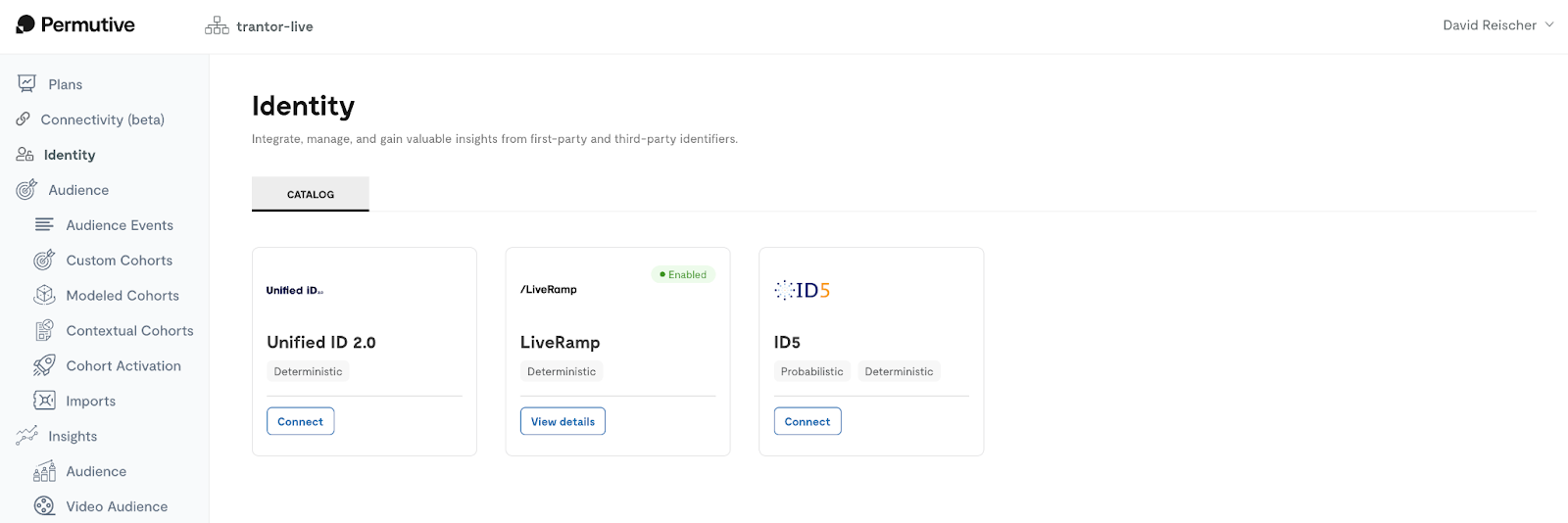
Publishers access the Identity Manager catalog in the Permutive Dashboard to view available ID vendor integrations. The catalog displays supported vendors with options to connect or view details of enabled integrations.
 ### Configuring an ID Integration
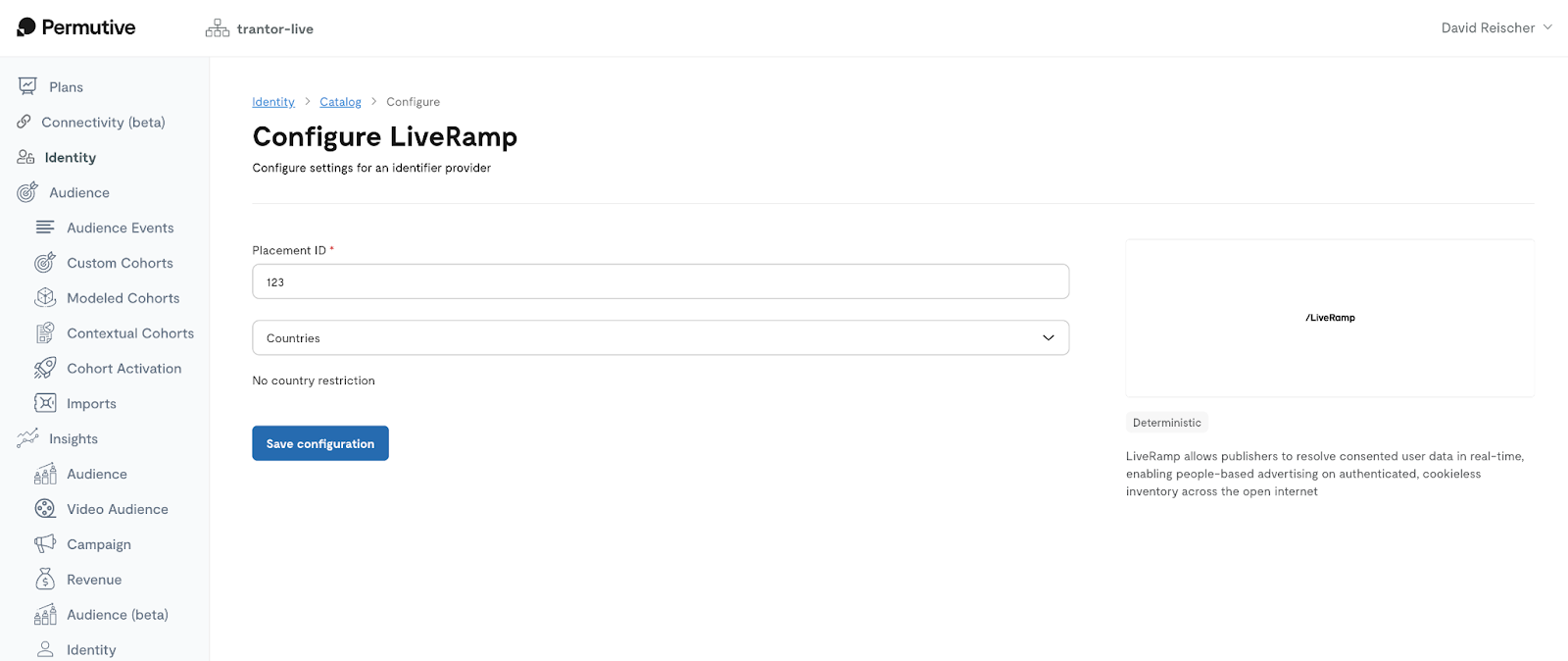
Publishers configure ID vendor integrations by providing vendor-specific credentials (Partner ID, Placement ID, or API key) obtained from the ID vendor. Optional geo rules can be configured to restrict the integration to specific countries based on user IP location.
### Configuring an ID Integration
Publishers configure ID vendor integrations by providing vendor-specific credentials (Partner ID, Placement ID, or API key) obtained from the ID vendor. Optional geo rules can be configured to restrict the integration to specific countries based on user IP location.
 ### Activating IDs to Prebid
Once configured, the Permutive SDK automatically retrieves encrypted IDs from enabled vendors and passes them into the bid stream via Prebid. The Permutive User ID Module for Prebid handles the integration, ensuring IDs are available during ad auctions in real-time.
## Guides
### Enabling Identity Manager for Your Organization
Identity Manager is available as part of the Permutive platform. To enable Identity Manager:
Navigate to the **Identity** section in the Permutive Dashboard.
Review the catalog of available ID vendor integrations.
Sign up with your chosen ID vendor(s) to obtain the required credentials (Partner ID, API key, or Placement ID). These vendors typically offer free accounts for publishers, with costs paid by advertisers who decrypt the IDs.
Ensure the [Permutive User ID Module](https://github.com/prebid/Prebid.js/blob/master/modules/permutiveIdentityManagerIdSystem.md) is added to your Prebid setup. This step only needs to be done once and supports all current and future ID integrations.
For managed Prebid implementations, contact your Prebid provider to add the Permutive User ID Module to your setup.
### Setting Up an ID Vendor Integration
To enable an ID vendor integration in Identity Manager:
In the Permutive Dashboard, go to **Identity** and access the Identity Manager catalog.
Click **Connect** for the ID vendor you want to enable.
Input the **Partner ID / Placement ID / API key** provided by the vendor. You receive these credentials after signing up and accepting the vendor's terms and conditions.
Set geographic restrictions to limit the integration to specific countries based on user IP location. This helps balance data exposure with incremental value.
### Activating IDs to Prebid
Once configured, the Permutive SDK automatically retrieves encrypted IDs from enabled vendors and passes them into the bid stream via Prebid. The Permutive User ID Module for Prebid handles the integration, ensuring IDs are available during ad auctions in real-time.
## Guides
### Enabling Identity Manager for Your Organization
Identity Manager is available as part of the Permutive platform. To enable Identity Manager:
Navigate to the **Identity** section in the Permutive Dashboard.
Review the catalog of available ID vendor integrations.
Sign up with your chosen ID vendor(s) to obtain the required credentials (Partner ID, API key, or Placement ID). These vendors typically offer free accounts for publishers, with costs paid by advertisers who decrypt the IDs.
Ensure the [Permutive User ID Module](https://github.com/prebid/Prebid.js/blob/master/modules/permutiveIdentityManagerIdSystem.md) is added to your Prebid setup. This step only needs to be done once and supports all current and future ID integrations.
For managed Prebid implementations, contact your Prebid provider to add the Permutive User ID Module to your setup.
### Setting Up an ID Vendor Integration
To enable an ID vendor integration in Identity Manager:
In the Permutive Dashboard, go to **Identity** and access the Identity Manager catalog.
Click **Connect** for the ID vendor you want to enable.
Input the **Partner ID / Placement ID / API key** provided by the vendor. You receive these credentials after signing up and accepting the vendor's terms and conditions.
Set geographic restrictions to limit the integration to specific countries based on user IP location. This helps balance data exposure with incremental value.
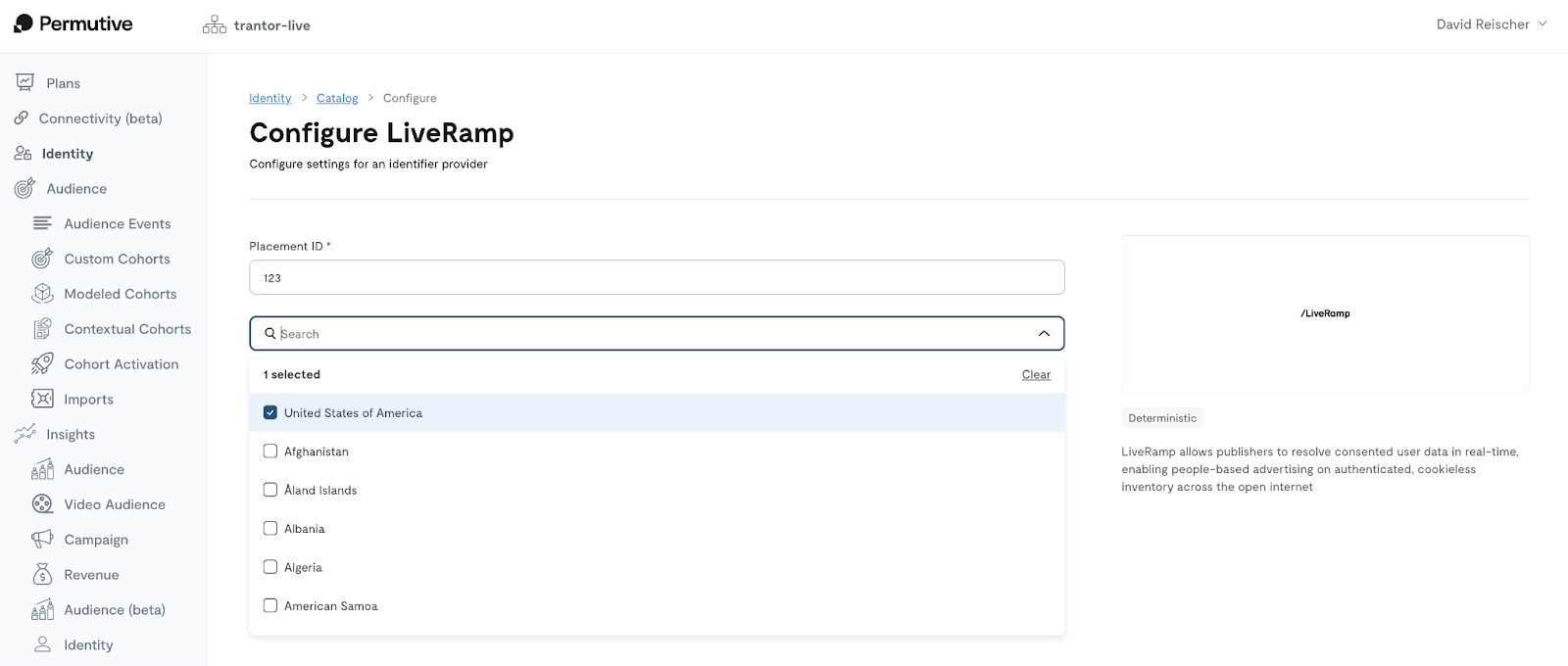 Click **Save Configuration** to enable the integration. The Permutive SDK will begin retrieving and activating IDs from this vendor in real-time.
**Tips for ID vendor setup:**
* Start with geo rules in high-value markets to test incrementality before expanding globally.
* Ensure the ID vendor is added to your consent management platform (CMP) vendor list before enabling the integration.
* The Permutive SDK will automatically check TCF consent before running vendor integrations.
**LiveRamp**
* Supports RampID, PAIR ID, and ATS Direct segments
* Requires hashed email (deterministic ID)
* IDs are stored locally in the browser for 15 days (California) or 30 days (other regions) to reduce API calls and improve performance
* PAIR IDs enable privacy-focused first-party data matching with advertisers using Google's Publisher Advertiser Identity Reconciliation framework
**UID2 (Unified ID 2.0)**
* Requires hashed email (deterministic ID)
* May be restricted in GDPR regions—confirm availability for your markets
* Subscription ID and public key required for setup
**ID5**
* Probabilistic ID solution (does not require hashed email)
* Permutive downloads the ID5 JavaScript SDK on your site to retrieve IDs
* Partner ID required for setup
### Managing ID Vendor Integrations
To manage existing ID vendor integrations:
Go to **Identity** in the Permutive Dashboard to access the Identity Manager catalog.
Integrations that are already enabled display a **View Details** button instead of **Connect**.
Click **View Details** to modify vendor credentials, update geo rules, or adjust other settings.
To turn off an integration, access the integration details and disable the vendor. The Permutive SDK will stop retrieving IDs from that vendor.
Click **Save Configuration** to enable the integration. The Permutive SDK will begin retrieving and activating IDs from this vendor in real-time.
**Tips for ID vendor setup:**
* Start with geo rules in high-value markets to test incrementality before expanding globally.
* Ensure the ID vendor is added to your consent management platform (CMP) vendor list before enabling the integration.
* The Permutive SDK will automatically check TCF consent before running vendor integrations.
**LiveRamp**
* Supports RampID, PAIR ID, and ATS Direct segments
* Requires hashed email (deterministic ID)
* IDs are stored locally in the browser for 15 days (California) or 30 days (other regions) to reduce API calls and improve performance
* PAIR IDs enable privacy-focused first-party data matching with advertisers using Google's Publisher Advertiser Identity Reconciliation framework
**UID2 (Unified ID 2.0)**
* Requires hashed email (deterministic ID)
* May be restricted in GDPR regions—confirm availability for your markets
* Subscription ID and public key required for setup
**ID5**
* Probabilistic ID solution (does not require hashed email)
* Permutive downloads the ID5 JavaScript SDK on your site to retrieve IDs
* Partner ID required for setup
### Managing ID Vendor Integrations
To manage existing ID vendor integrations:
Go to **Identity** in the Permutive Dashboard to access the Identity Manager catalog.
Integrations that are already enabled display a **View Details** button instead of **Connect**.
Click **View Details** to modify vendor credentials, update geo rules, or adjust other settings.
To turn off an integration, access the integration details and disable the vendor. The Permutive SDK will stop retrieving IDs from that vendor.
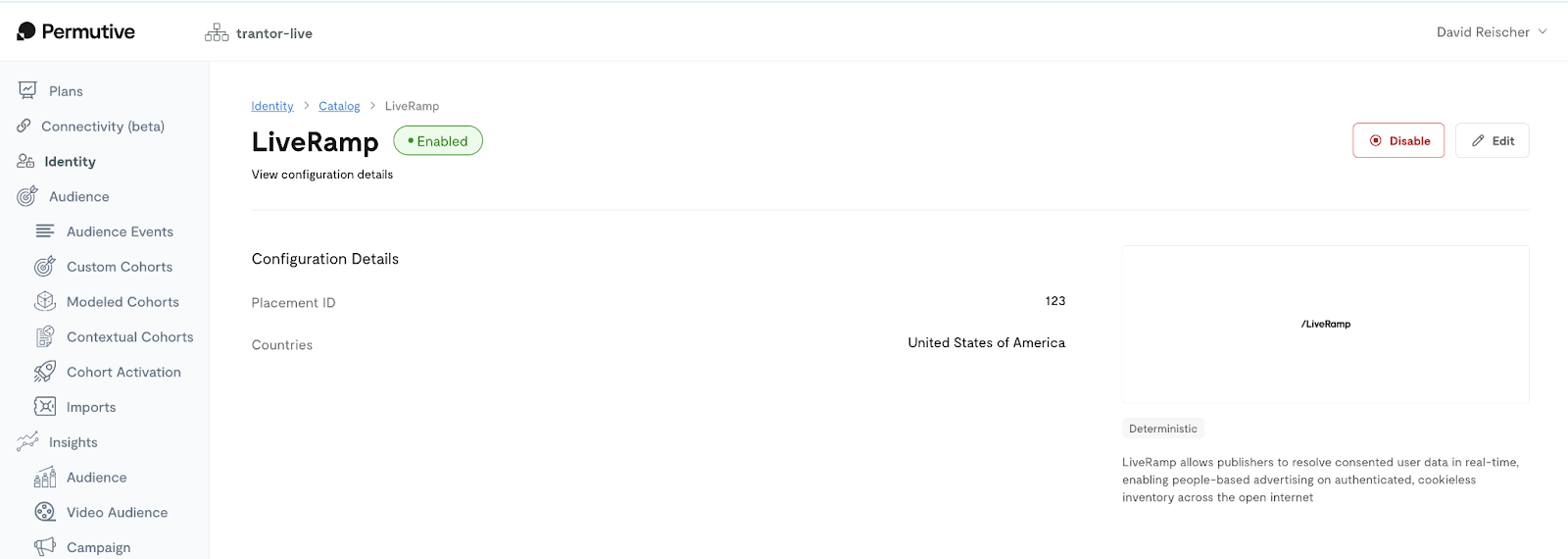 Changes to integration configuration take effect immediately. The Permutive SDK will begin using updated settings in real-time.
### Setting Up the Permutive User ID Module for Prebid
The Permutive User ID Module for Prebid is required for Identity Manager to work. This module acts as an interface between the Permutive SDK and Prebid, passing identity envelopes into the bid stream.
Identify whether you manage your own Prebid implementation (self-managed) or use a managed Prebid service provider.
* **Self-managed Prebid**: Add the Permutive User ID Module to your Prebid configuration file. See the [Permutive User ID Module documentation](https://github.com/prebid/Prebid.js/blob/master/modules/permutiveIdentityManagerIdSystem.md) for implementation details.
* **Managed Prebid**: Contact your Prebid provider and request that they add the Permutive User ID Module to your setup.
Confirm the module is included in your Prebid build and is receiving identity envelopes from the Permutive SDK.
The Permutive User ID Module only needs to be added once. It will support all current and future ID vendor integrations enabled through Identity Manager.
## Troubleshooting
If identity envelopes are not being passed to Prebid, check the following:
* **Prebid module not installed**: Verify the Permutive User ID Module is included in your Prebid setup
* **Vendor not in CMP**: Ensure the ID vendor is added to your consent management platform's vendor list
* **Geo restrictions**: Check if geo rules are blocking the integration in the user's location
* **Vendor credentials incorrect**: Verify the Partner ID / API key / Placement ID is correct in the integration configuration
* **SDK timing**: Ensure the Permutive SDK loads before Prebid runs to allow sufficient time for ID retrieval
**Solution**: Review your Prebid configuration, verify consent settings, check geo rules, and confirm vendor credentials are correct.
Identity Manager checks TCF consent before running vendor integrations. If consent requirements are not met, IDs will not be retrieved.
* **Vendor missing from CMP**: The ID vendor must be listed in your consent management platform
* **Required consent purposes not granted**: Each vendor has specific TCF consent requirements
* **Consent string not available**: The Permutive SDK must be able to access the consent string
**Solution**: Add the ID vendor to your CMP vendor list, ensure required consent purposes are configured, and verify the consent string is accessible to the Permutive SDK.
If you cannot save an integration configuration, check:
* **Invalid credentials**: The Partner ID / API key / Placement ID format may be incorrect
* **Missing required fields**: Ensure all required configuration fields are filled out
* **Permissions issues**: Verify you have permission to configure integrations in your workspace
**Solution**: Verify credentials with your ID vendor, complete all required fields, and check your workspace permissions.
If you're not seeing CPM increases after enabling Identity Manager:
* **Insufficient time for testing**: Allow several days to a week for meaningful data collection
* **Low advertiser demand**: Not all advertisers support alternative IDs; demand varies by market
* **Geo restrictions limiting scale**: Narrow geo rules may limit the number of users with IDs
* **Hashed email availability**: Deterministic IDs (LiveRamp, UID2) require hashed emails, which may not be available for all users
**Solution**: Allow sufficient testing time, consider expanding geo rules if appropriate, review vendor match rates, and evaluate whether your audience has sufficient hashed email availability for deterministic IDs.
## Environment Compatibility
#### Core Product
Identity Manager functionality is currently supported on the following platforms:
| Functionality | Web | iOS | Android | CTV | API Direct |
| :--------------------- | :----------- | :---------- | :---------- | :---------- | :---------- |
| ID vendor integration | | | | | |
| Real-time ID retrieval | | | | | |
| Prebid activation | | | | | |
| Geo-based restrictions | | | | | |
App (iOS, Android) and CTV support is planned for future releases. API Direct is not currently on the roadmap for Identity Manager.
#### Activation
Identity Manager currently supports activation through:
* **Prebid**: All SSPs and DSPs that support alternative IDs through Prebid
* **LiveRamp**: RampID, PAIR ID, and ATS Direct segments
* **\[Coming Soon] UID2**: Unified ID 2.0 framework participants
* **ID5**: ID5 Universal ID ecosystem
Google Secure Signals activation is planned for a future release.
## Dependencies
Identity Manager relies on the following products and configurations:
| Dependency | Required | Description |
| :-------------------------- | :------- | :--------------------------------------------------------------------------------------------------------------------------- |
| Permutive SDK (Web) | ✓ | The Permutive Web SDK must be deployed to retrieve IDs from vendors and pass them to Prebid in real-time. |
| Prebid | ✓ | Prebid is required for passing identity envelopes into the bid stream for programmatic activation. |
| Permutive User ID Module | ✓ | The Permutive User ID Module for Prebid acts as the interface between the Permutive SDK and Prebid. |
| Consent Management Platform | ✓ | ID vendors must be added to your CMP vendor list. The Permutive SDK checks TCF consent before running vendor integrations. |
| ID Vendor Account | ✓ | Publishers must sign up with each ID vendor (LiveRamp, UID2, ID5) to obtain credentials (Partner ID, API key, Placement ID). |
| Hashed Email Collection | \~ | Required only for deterministic ID vendors (LiveRamp, UID2). Not required for probabilistic vendors (ID5). |
## Limits
Identity Manager adheres to the following product specifications and limits.
#### Feature Limits
| Feature | Description | Limit |
| :------------------------ | :------------------------------------------------------------------------------------- | :------------------------ |
| Supported ID vendors | The number of ID vendor integrations currently available in Identity Manager. | 2 vendors (LiveRamp, ID5) |
| Active integrations | The number of ID vendor integrations that can be enabled simultaneously per workspace. | No limit |
| Geo rules per integration | The number of countries that can be configured in geo rules for a single integration. | No limit |
#### Performance Limits
| Metric | Description | Limit |
| :--------------------------- | :----------------------------------------------------------------------------- | :-------------------------------------------- |
| ID retrieval time | The time it takes for the Permutive SDK to retrieve IDs from vendors. | Varies by vendor (typically under 500ms) |
| Local storage TTL (LiveRamp) | Time-to-live for locally stored LiveRamp identifiers. | 15 days (California), 30 days (other regions) |
| Prebid integration latency | Additional latency introduced to ad auctions by Identity Manager ID retrieval. | Minimal (under 100ms in most cases) |
#### Usage Limits
| SKU | Description | Limit |
| :--------------- | :---------------------------------------------- | :------------------------------------------------- |
| Identity Manager | Usage limits for Identity Manager integrations. | \[Contact [Support](mailto:support@permutive.com)] |
## FAQ
**LiveRamp** and **UID2** are deterministic ID solutions that require hashed email addresses. **ID5** is a probabilistic ID solution that does not require hashed email and can work with anonymous users.
No, Identity Manager currently only supports activation through Prebid. The Permutive User ID Module for Prebid is required to pass identity envelopes into the bid stream. Google Secure Signals activation is planned for a future release.
Yes, Identity Manager works with managed Prebid implementations. You will need to contact your Prebid provider and ask them to add the Permutive User ID Module to your Prebid configuration. Once the module is added, Identity Manager will work with your existing setup.
Geo rules allow you to restrict ID vendor integrations to specific countries based on the user's IP location. When a user visits your site, the Permutive SDK determines their country from their IP address. If the country is not included in your geo rules for a particular vendor, that vendor's IDs will not be retrieved for that user. This helps you balance data exposure with incremental value.
Identity Manager does not currently provide built-in measurement tools for CPM impact. Publishers should monitor their programmatic revenue metrics through their ad server or SSPs to evaluate the impact of enabling alternative IDs. Many publishers conduct A/B tests by enabling IDs in specific geos or for a percentage of traffic to measure incrementality.
No, identity envelopes from Identity Manager are not currently added to the Permutive Identity Graph. Identity Manager retrieves ephemeral, encrypted IDs that are only used for passing into the bid stream via Prebid. These IDs cannot be used for identity resolution, cross-domain tracking, or audience imports. Integration with the Identity Graph is being considered for future development.
All three are LiveRamp identity solutions with different use cases:
* **RampID**: LiveRamp's core encrypted identifier passed into the bid stream for programmatic activation
* **PAIR ID**: Google's Publisher Advertiser Identity Reconciliation (PAIR) framework identifier, enabling privacy-focused first-party data matching with advertisers
* **ATS Direct**: LiveRamp's Authenticated Traffic Solution for direct publisher-advertiser data matching
Identity Manager supports all three LiveRamp identity types and stores them locally for improved performance.
Identity Manager currently supports LiveRamp and ID5, with UID2 coming soon. Additional ID vendor integrations may be added in future releases. If you have specific vendor integration requests, please share your feedback with your Customer Success Manager.
## Changelog
### 2025
**December 2025**
* Enhanced LiveRamp integration with local storage for RampID, PAIR ID, and ATS Direct segments
* Added PAIR ID activation to Prebid for Google's Publisher Advertiser Identity Reconciliation framework
* Implemented region-aware TTL management (15 days for California, 30 days for other regions)
### 2024
**November 2024**
* Initial release of Identity Manager with support for LiveRamp and ID5 integrations (UID2 coming soon)
* No-code integration workflow in Permutive Dashboard
* Geo-based restrictions for ID vendor integrations
* Prebid activation via Permutive User ID Module
For detailed changelog information, visit our [Changelog](https://changelog.permutive.com/).
Changes to integration configuration take effect immediately. The Permutive SDK will begin using updated settings in real-time.
### Setting Up the Permutive User ID Module for Prebid
The Permutive User ID Module for Prebid is required for Identity Manager to work. This module acts as an interface between the Permutive SDK and Prebid, passing identity envelopes into the bid stream.
Identify whether you manage your own Prebid implementation (self-managed) or use a managed Prebid service provider.
* **Self-managed Prebid**: Add the Permutive User ID Module to your Prebid configuration file. See the [Permutive User ID Module documentation](https://github.com/prebid/Prebid.js/blob/master/modules/permutiveIdentityManagerIdSystem.md) for implementation details.
* **Managed Prebid**: Contact your Prebid provider and request that they add the Permutive User ID Module to your setup.
Confirm the module is included in your Prebid build and is receiving identity envelopes from the Permutive SDK.
The Permutive User ID Module only needs to be added once. It will support all current and future ID vendor integrations enabled through Identity Manager.
## Troubleshooting
If identity envelopes are not being passed to Prebid, check the following:
* **Prebid module not installed**: Verify the Permutive User ID Module is included in your Prebid setup
* **Vendor not in CMP**: Ensure the ID vendor is added to your consent management platform's vendor list
* **Geo restrictions**: Check if geo rules are blocking the integration in the user's location
* **Vendor credentials incorrect**: Verify the Partner ID / API key / Placement ID is correct in the integration configuration
* **SDK timing**: Ensure the Permutive SDK loads before Prebid runs to allow sufficient time for ID retrieval
**Solution**: Review your Prebid configuration, verify consent settings, check geo rules, and confirm vendor credentials are correct.
Identity Manager checks TCF consent before running vendor integrations. If consent requirements are not met, IDs will not be retrieved.
* **Vendor missing from CMP**: The ID vendor must be listed in your consent management platform
* **Required consent purposes not granted**: Each vendor has specific TCF consent requirements
* **Consent string not available**: The Permutive SDK must be able to access the consent string
**Solution**: Add the ID vendor to your CMP vendor list, ensure required consent purposes are configured, and verify the consent string is accessible to the Permutive SDK.
If you cannot save an integration configuration, check:
* **Invalid credentials**: The Partner ID / API key / Placement ID format may be incorrect
* **Missing required fields**: Ensure all required configuration fields are filled out
* **Permissions issues**: Verify you have permission to configure integrations in your workspace
**Solution**: Verify credentials with your ID vendor, complete all required fields, and check your workspace permissions.
If you're not seeing CPM increases after enabling Identity Manager:
* **Insufficient time for testing**: Allow several days to a week for meaningful data collection
* **Low advertiser demand**: Not all advertisers support alternative IDs; demand varies by market
* **Geo restrictions limiting scale**: Narrow geo rules may limit the number of users with IDs
* **Hashed email availability**: Deterministic IDs (LiveRamp, UID2) require hashed emails, which may not be available for all users
**Solution**: Allow sufficient testing time, consider expanding geo rules if appropriate, review vendor match rates, and evaluate whether your audience has sufficient hashed email availability for deterministic IDs.
## Environment Compatibility
#### Core Product
Identity Manager functionality is currently supported on the following platforms:
| Functionality | Web | iOS | Android | CTV | API Direct |
| :--------------------- | :----------- | :---------- | :---------- | :---------- | :---------- |
| ID vendor integration | | | | | |
| Real-time ID retrieval | | | | | |
| Prebid activation | | | | | |
| Geo-based restrictions | | | | | |
App (iOS, Android) and CTV support is planned for future releases. API Direct is not currently on the roadmap for Identity Manager.
#### Activation
Identity Manager currently supports activation through:
* **Prebid**: All SSPs and DSPs that support alternative IDs through Prebid
* **LiveRamp**: RampID, PAIR ID, and ATS Direct segments
* **\[Coming Soon] UID2**: Unified ID 2.0 framework participants
* **ID5**: ID5 Universal ID ecosystem
Google Secure Signals activation is planned for a future release.
## Dependencies
Identity Manager relies on the following products and configurations:
| Dependency | Required | Description |
| :-------------------------- | :------- | :--------------------------------------------------------------------------------------------------------------------------- |
| Permutive SDK (Web) | ✓ | The Permutive Web SDK must be deployed to retrieve IDs from vendors and pass them to Prebid in real-time. |
| Prebid | ✓ | Prebid is required for passing identity envelopes into the bid stream for programmatic activation. |
| Permutive User ID Module | ✓ | The Permutive User ID Module for Prebid acts as the interface between the Permutive SDK and Prebid. |
| Consent Management Platform | ✓ | ID vendors must be added to your CMP vendor list. The Permutive SDK checks TCF consent before running vendor integrations. |
| ID Vendor Account | ✓ | Publishers must sign up with each ID vendor (LiveRamp, UID2, ID5) to obtain credentials (Partner ID, API key, Placement ID). |
| Hashed Email Collection | \~ | Required only for deterministic ID vendors (LiveRamp, UID2). Not required for probabilistic vendors (ID5). |
## Limits
Identity Manager adheres to the following product specifications and limits.
#### Feature Limits
| Feature | Description | Limit |
| :------------------------ | :------------------------------------------------------------------------------------- | :------------------------ |
| Supported ID vendors | The number of ID vendor integrations currently available in Identity Manager. | 2 vendors (LiveRamp, ID5) |
| Active integrations | The number of ID vendor integrations that can be enabled simultaneously per workspace. | No limit |
| Geo rules per integration | The number of countries that can be configured in geo rules for a single integration. | No limit |
#### Performance Limits
| Metric | Description | Limit |
| :--------------------------- | :----------------------------------------------------------------------------- | :-------------------------------------------- |
| ID retrieval time | The time it takes for the Permutive SDK to retrieve IDs from vendors. | Varies by vendor (typically under 500ms) |
| Local storage TTL (LiveRamp) | Time-to-live for locally stored LiveRamp identifiers. | 15 days (California), 30 days (other regions) |
| Prebid integration latency | Additional latency introduced to ad auctions by Identity Manager ID retrieval. | Minimal (under 100ms in most cases) |
#### Usage Limits
| SKU | Description | Limit |
| :--------------- | :---------------------------------------------- | :------------------------------------------------- |
| Identity Manager | Usage limits for Identity Manager integrations. | \[Contact [Support](mailto:support@permutive.com)] |
## FAQ
**LiveRamp** and **UID2** are deterministic ID solutions that require hashed email addresses. **ID5** is a probabilistic ID solution that does not require hashed email and can work with anonymous users.
No, Identity Manager currently only supports activation through Prebid. The Permutive User ID Module for Prebid is required to pass identity envelopes into the bid stream. Google Secure Signals activation is planned for a future release.
Yes, Identity Manager works with managed Prebid implementations. You will need to contact your Prebid provider and ask them to add the Permutive User ID Module to your Prebid configuration. Once the module is added, Identity Manager will work with your existing setup.
Geo rules allow you to restrict ID vendor integrations to specific countries based on the user's IP location. When a user visits your site, the Permutive SDK determines their country from their IP address. If the country is not included in your geo rules for a particular vendor, that vendor's IDs will not be retrieved for that user. This helps you balance data exposure with incremental value.
Identity Manager does not currently provide built-in measurement tools for CPM impact. Publishers should monitor their programmatic revenue metrics through their ad server or SSPs to evaluate the impact of enabling alternative IDs. Many publishers conduct A/B tests by enabling IDs in specific geos or for a percentage of traffic to measure incrementality.
No, identity envelopes from Identity Manager are not currently added to the Permutive Identity Graph. Identity Manager retrieves ephemeral, encrypted IDs that are only used for passing into the bid stream via Prebid. These IDs cannot be used for identity resolution, cross-domain tracking, or audience imports. Integration with the Identity Graph is being considered for future development.
All three are LiveRamp identity solutions with different use cases:
* **RampID**: LiveRamp's core encrypted identifier passed into the bid stream for programmatic activation
* **PAIR ID**: Google's Publisher Advertiser Identity Reconciliation (PAIR) framework identifier, enabling privacy-focused first-party data matching with advertisers
* **ATS Direct**: LiveRamp's Authenticated Traffic Solution for direct publisher-advertiser data matching
Identity Manager supports all three LiveRamp identity types and stores them locally for improved performance.
Identity Manager currently supports LiveRamp and ID5, with UID2 coming soon. Additional ID vendor integrations may be added in future releases. If you have specific vendor integration requests, please share your feedback with your Customer Success Manager.
## Changelog
### 2025
**December 2025**
* Enhanced LiveRamp integration with local storage for RampID, PAIR ID, and ATS Direct segments
* Added PAIR ID activation to Prebid for Google's Publisher Advertiser Identity Reconciliation framework
* Implemented region-aware TTL management (15 days for California, 30 days for other regions)
### 2024
**November 2024**
* Initial release of Identity Manager with support for LiveRamp and ID5 integrations (UID2 coming soon)
* No-code integration workflow in Permutive Dashboard
* Geo-based restrictions for ID vendor integrations
* Prebid activation via Permutive User ID Module
For detailed changelog information, visit our [Changelog](https://changelog.permutive.com/).