> ## Documentation Index
> Fetch the complete documentation index at: https://docs.permutive.com/llms.txt
> Use this file to discover all available pages before exploring further.
# Custom Cohorts
> Build flexible audience segments based on user behavior and data imports.
export const NoBadge = () => {
return
No
;
};
export const YesBadge = () => {
return
Yes
;
};
## Overview
**Custom Cohorts** enable publishers to build flexible, granular audience segments based on any combination of user behaviors, properties, and data sources. These cohorts are computed on device for real-time targeting and activation.
Publishers can create cohorts using first-party data (behaviors on their properties), second-party data (partner data), and third-party data, allowing for highly customized audience targeting that meets specific campaign needs and advertiser requirements.
## Why Use Custom Cohorts?
**Build audiences for any campaign need** — Custom Cohorts provide publishers with complete flexibility to create audience segments tailored to specific campaigns and advertiser briefs. Whether targeting users based on content engagement, recency, frequency, or custom event properties, Custom Cohorts enable publishers to meet diverse targeting requirements.
**Leverage multiple data sources** — Build cohorts not just from your own first-party behavioral data, but also incorporate second-party data from partners and third-party data providers. This allows publishers to enrich their audience understanding and create more valuable, targetable segments for advertisers.
**Real-time Edge Computation** — Custom Cohorts are computed on the Edge, enabling real-time user segmentation and activation on device. This ensures that your audience targeting is always current and responsive to user behavior as it happens.
## Concepts
### Definitions
* **Custom Cohort**: A publisher-defined audience segment that groups users based on specific rules and conditions. Users are added to or removed from cohorts in real-time as they meet or no longer meet the cohort criteria.
* **Cohort Builder**: The UI tool within the Permutive Dashboard that allows publishers to create and manage Custom Cohorts using a visual, no-code interface.
* **Event**: An action or occurrence that is tracked by the Permutive SDK, such as a Pageview, VideoView, or custom event. Events form the foundation of cohort definitions.
* **Properties**: Attributes associated with events that provide additional context, such as `client.url`, `client.title`, or custom properties. Properties enable fine-grained filtering when building cohorts.
* **Recency**: The time window in which a user must have performed an action to qualify for a cohort (e.g., "in the past 30 days").
* **Frequency**: The number of times a user must have performed an action to qualify for a cohort (e.g., "at least 3 times").
* **User Group Cohort**: A special type of Custom Cohort that targets groups of users (such as households) rather than individual users. Behavior is aggregated across the entire group.
* **Predicted Audience Size (PAS)**: An estimate of how many users would have qualified for a cohort based on the past 30 days of historical data. PAS is computed server-side when you click *Calculate* in the Cohort Builder. It is useful for forecasting whether a cohort will deliver sufficient scale for a campaign and is available immediately after defining cohort rules.
* **Live Audience Size (LAS)**: The count of users who currently qualify for an active cohort. LAS is updated periodically (approximately every 4 hours) as users are evaluated against the cohort criteria. When a cohort is first deployed, LAS starts at zero and grows as qualifying users are processed. LAS represents the audience you can actually reach in live campaigns.
## Workflows
### Creating a Custom Cohort
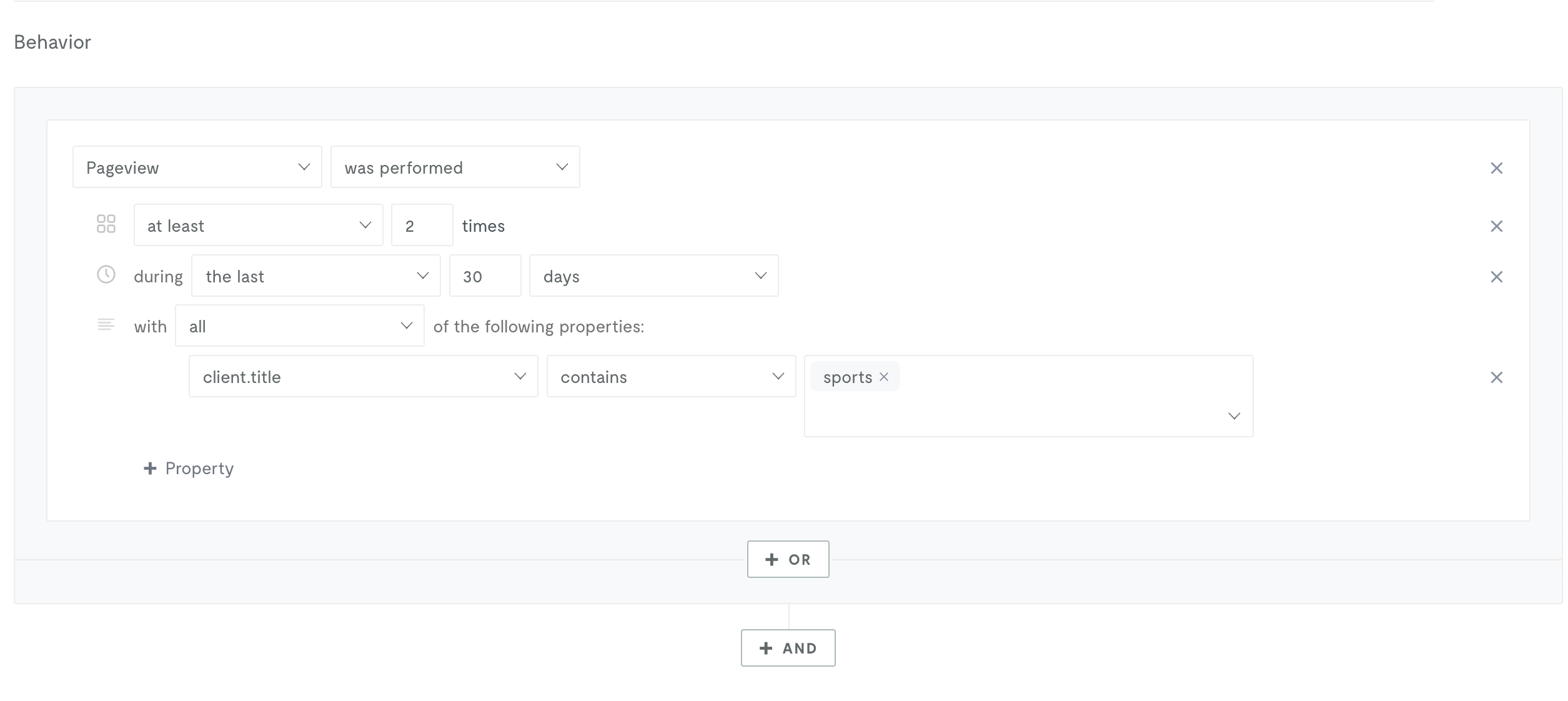
Publishers use the Cohort Builder to define rules for their audience segments. They select events, specify properties, set recency and frequency requirements, and combine multiple conditions using AND/OR logic to create precise targeting criteria.
 ### Deploying a Custom Cohort
Once a Custom Cohort is created and validated with an audience size calculation (this shows the [predicted audience size](#whats-the-difference-between-predicted-audience-size-and-live-audience-size)), you can control whether it is deployed to the Permutive SDK via the cohort's **status** toggle (on/off) on the cohort list page. After deployment, the cohort's [Live Audience Size](#whats-the-difference-between-predicted-audience-size-and-live-audience-size) will start at zero and grow over time as users are evaluated. The status toggle determines whether the cohort gets included for evaluation in the SDK:
* **On (enabled)**: The cohort is included in the SDK and users will be evaluated against it in real-time
* **Off (disabled)**: The cohort is not included in the SDK and users will not be evaluated against it
Enabling or disabling a cohort triggers an automatic rebuild of your SDK. The cohort change should be available shortly thereafter (typically within 2-5 minutes). Once deployed and enabled, the SDK evaluates users in real-time against the cohort criteria as they interact with your properties.
### Deploying a Custom Cohort
Once a Custom Cohort is created and validated with an audience size calculation (this shows the [predicted audience size](#whats-the-difference-between-predicted-audience-size-and-live-audience-size)), you can control whether it is deployed to the Permutive SDK via the cohort's **status** toggle (on/off) on the cohort list page. After deployment, the cohort's [Live Audience Size](#whats-the-difference-between-predicted-audience-size-and-live-audience-size) will start at zero and grow over time as users are evaluated. The status toggle determines whether the cohort gets included for evaluation in the SDK:
* **On (enabled)**: The cohort is included in the SDK and users will be evaluated against it in real-time
* **Off (disabled)**: The cohort is not included in the SDK and users will not be evaluated against it
Enabling or disabling a cohort triggers an automatic rebuild of your SDK. The cohort change should be available shortly thereafter (typically within 2-5 minutes). Once deployed and enabled, the SDK evaluates users in real-time against the cohort criteria as they interact with your properties.
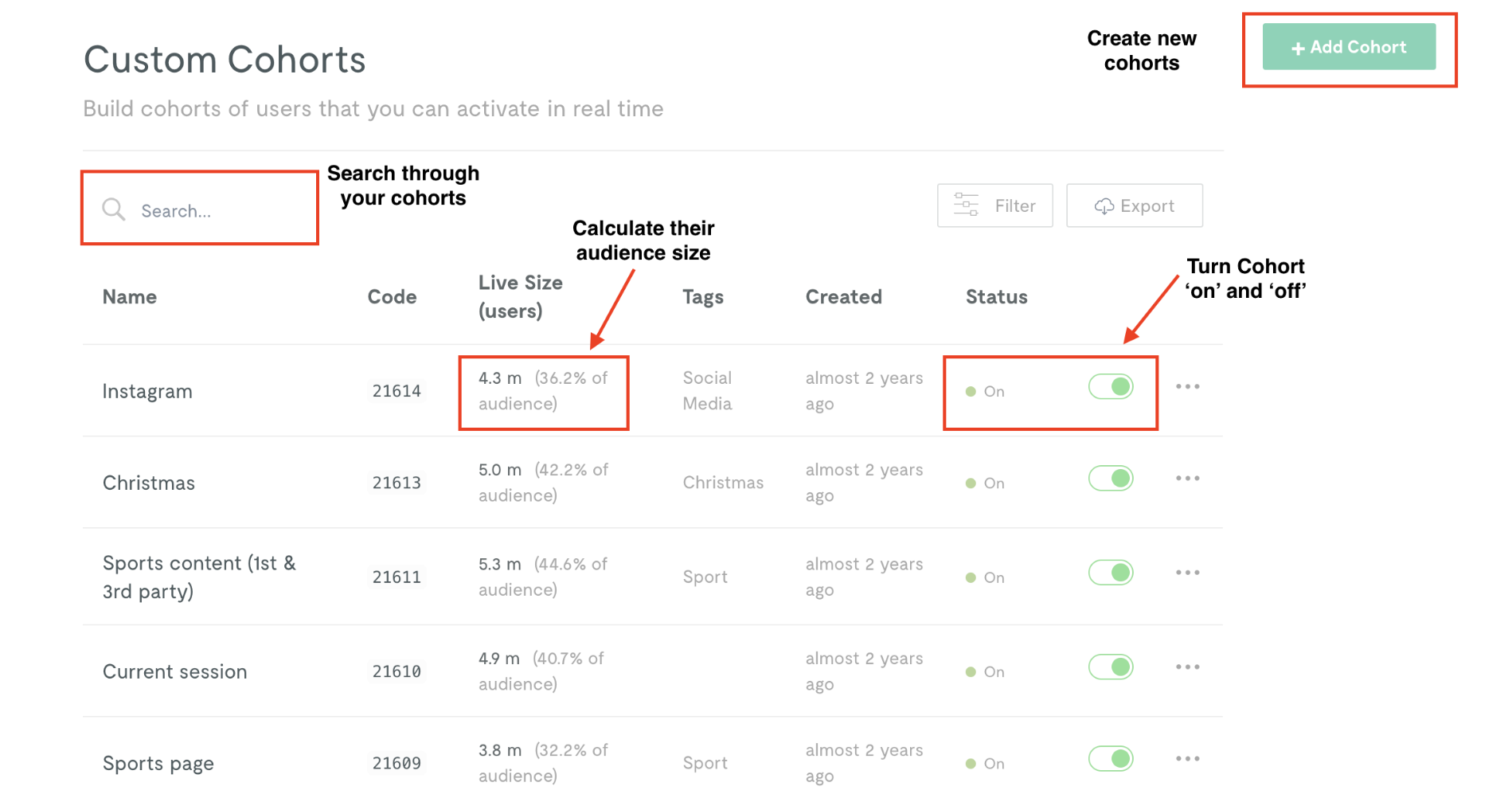 All Custom Cohorts are displayed in the *Custom Cohorts* section of the Permutive Dashboard. The Cohort List provides an overview including cohort name, cohort code, tags, audience size (predicted and live), precision type (User or User Group), date created (UTC), status (Enabled/Disabled), and cohort logic. You can filter and sort cohorts by various attributes to find specific cohorts or analyze your cohort inventory.
### Activating a Custom Cohort
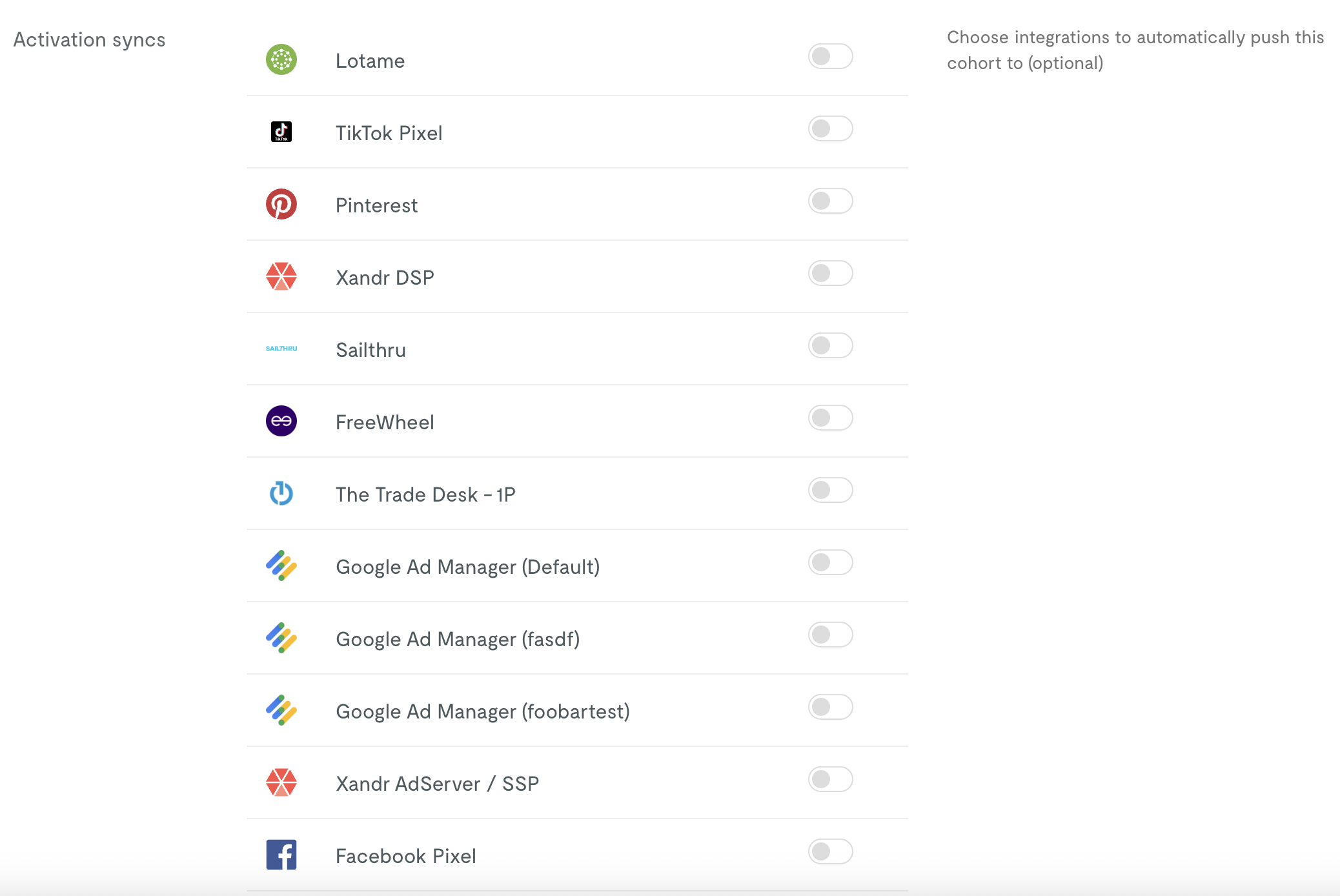
Custom Cohorts can be activated to advertising platforms such as Google Ad Manager, Xandr, or other destinations. Activations can be configured during cohort creation or added later from the cohort management interface. The Permutive SDK manages passing cohort memberships to these platforms in real-time for ad targeting.
All Custom Cohorts are displayed in the *Custom Cohorts* section of the Permutive Dashboard. The Cohort List provides an overview including cohort name, cohort code, tags, audience size (predicted and live), precision type (User or User Group), date created (UTC), status (Enabled/Disabled), and cohort logic. You can filter and sort cohorts by various attributes to find specific cohorts or analyze your cohort inventory.
### Activating a Custom Cohort
Custom Cohorts can be activated to advertising platforms such as Google Ad Manager, Xandr, or other destinations. Activations can be configured during cohort creation or added later from the cohort management interface. The Permutive SDK manages passing cohort memberships to these platforms in real-time for ad targeting.
 ## Guides
Step-by-step instructions for working with Custom Cohorts.
Build a new audience segment using the Cohort Builder
Modify existing cohort rules and settings
Remove cohorts from your project
Export a report of all cohorts
Advanced use cases for Custom Cohorts:
Create cohorts based on Internet Service Provider
Build cohorts from external data sources
Target households instead of individuals
## Troubleshooting
The following errors may occur when working with Custom Cohorts:
If your cohort fails to calculate an audience size, this may be due to:
* Complex cohort rules that time out during calculation
* Using unsupported event types or properties
* Data processing delays
**Solution**: Try simplifying your cohort rules, verify that the events and properties exist in your data, and wait a few minutes before trying again. If the issue persists, contact [Support](mailto:support@permutive.com).
The [Live Audience Size (LAS)](#whats-the-difference-between-predicted-audience-size-and-live-audience-size) starts at zero for every new cohort and grows over time as users are evaluated. If LAS remains at zero or is unexpectedly small, check:
* The cohort was recently deployed — allow time for users to visit and be evaluated
* The Permutive SDK may not be deployed on all relevant pages
* The recency window may be too narrow or frequency threshold too high
* Event properties may have typos or incorrect values
* For cohorts using audience imports, imported users must visit your properties before they can be counted in LAS
**Solution**: Allow at least 24–48 hours after deployment for LAS to begin reflecting users. Broaden your criteria if needed, verify event tracking is working correctly, and check property values in the Event Inspector. For import-based cohorts, see [Understanding Audience Size for Import Cohorts](/guides/signals/cohorts/custom/using-audience-imports#understanding-audience-size-for-import-cohorts).
This is expected behavior for newly deployed cohorts. The [Predicted Audience Size (PAS)](#whats-the-difference-between-predicted-audience-size-and-live-audience-size) reflects historical data — how many users *would have* qualified in the past 30 days. The [Live Audience Size (LAS)](#whats-the-difference-between-predicted-audience-size-and-live-audience-size) counts only users evaluated since the cohort was deployed.
* LAS will converge toward PAS as more users visit your properties over the following days and weeks
* For most behavioral cohorts, expect LAS to stabilize within approximately 30 days
* For cohorts using audience imports, convergence may take longer because imported users must visit your properties and be identified before they can be evaluated
**Solution**: This is normal — no action is required. If LAS remains at zero after several days, check that the SDK is up to date and that import data (if applicable) is being ingested correctly.
Cohort save errors typically occur due to:
* Missing required fields (name, tags)
* Invalid cohort logic or syntax
* Permissions issues
**Solution**: Ensure all required fields are filled out, review your cohort logic for any issues, and verify you have permission to create cohorts in your workspace.
If a cohort is not showing up in your activation platform:
* The activation may not be properly configured
* There may be a delay in cohort deployment (typically a few minutes)
* The cohort may have no users qualifying for it
* API keys or integrations may not be properly set up
**Solution**: Verify activation configuration, wait a few minutes for deployment, check cohort audience size, and ensure integration credentials are correct.
## Environment Compatibility
#### Core Product
Custom Cohorts functionality is supported on the following platforms:
| Functionality | Web | iOS | Android | CTV | API Direct |
| :--------------------------- | :----------- | :----------- | :----------- | :----------- | :-------------- |
| Cohort creation & management | | | | | |
| Event collection | | | | | |
| Real-time segmentation | | | | | |
| Cohort activation | | | | | \* |
\* For API Direct, activation information is returned in the response from the Permutive API, but the client is typically responsible for integrating with the activation destination.
#### Activation
Custom Cohorts can be activated to all standard Permutive activation destinations, including:
* Google Ad Manager
* Xandr
* Amazon Publisher Services
* Prebid-supported SSPs (Magnite, Rubicon, etc.)
* And many more via our activation integrations
For a complete list of supported activation destinations, please see our [Integrations documentation](/integrations/overview).
#### User Group Cohorts
User Group Cohorts have limited platform support:
| Functionality | Web | iOS | Android | CTV | API Direct |
| :--------------- | :----------- | :----------- | :----------- | :----------- | :-------------- |
| Event collection | | | | | |
| Activation | | | | | \* |
\* Activation information is returned in the response from the Permutive API, but the client is responsible for integrating with the activation destination. User Group cohorts are activated against User IDs, not Group IDs.
## Dependencies
Custom Cohorts rely on the following products and features being configured for your organization:
| Dependency | Required | Description |
| :--------------- | :------- | :------------------------------------------------------------------------------------------------------------------------------------------------------------ |
| Permutive SDK | ✓ | The Permutive SDK (Web, iOS, Android, or CTV) must be deployed to track events and enable real-time cohort evaluation and activation. |
| Event Tracking | ✓ | Events must be properly tracked and transmitted to Permutive for cohorts to function. At minimum, Pageview events are required. |
| Identity Graph | \~ | When using second-party data or User Group Cohorts, appropriate identifiers must be configured in Identity Graph and shared between you and the data partner. |
| Connectivity | \~ | Required for importing user group membership data when using User Group Cohorts, or for certain advanced cohort use cases. |
| Audience Imports | \~ | Required only if building cohorts based on external user lists or segments (second-party or third-party data). |
## Limits
Custom Cohorts adhere to the following product specifications and limits.
#### Feature Limits
| Feature | Description | Limit |
| :-------------------------- | :---------------------------------------------------------------------------------------- | :----------------- |
| Cohort rule complexity | The maximum number of conditions, AND/OR statements, and nested logic in a single cohort. | No hard limit |
| User Group identifier types | The number of user group identifier types supported per organization. | Multiple supported |
| Custom event types | The number of custom event types that can be used in cohort definitions. | No limit |
#### Performance Limits
| Metric | Description | Limit |
| :----------------------------- | :----------------------------------------------------------------------------------------------- | :------------------------ |
| Audience size calculation time | The time it takes to calculate historical audience size for a cohort. | \~30 seconds to 2 minutes |
| Cohort deployment time | The time it takes for a newly created cohort to be available in the SDK for evaluation. | 2-5 minutes |
| Activation deployment time | The time it takes for a newly created or updated cohort to be available in activation platforms. | 2-5 minutes |
#### Usage Limits
| SKU | Description | Limit |
| :------------- | :----------------------------------------------------- | :----------------- |
| Custom Cohorts | Maximum number of active Custom Cohorts per workspace. | \[Contact support] |
## FAQ
PAS and LAS measure different things. PAS tells you how many users *could* be in a cohort based on past behavior — it reflects potential. LAS tells you how many users *are* in the cohort right now — it reflects reality. A newly deployed cohort will always show a higher PAS than LAS because LAS needs time to build as users are evaluated.
| | Predicted Audience Size (PAS) | Live Audience Size (LAS) |
| :---------------- | :--------------------------------------- | :------------------------------------------------------------------ |
| What it measures | Estimated users from the past 30 days | Actual users currently qualifying |
| When available | Immediately after clicking *Calculate* | Builds over time after deployment |
| How it's computed | Server-side, using historical data | Updated periodically (approximately every 4 hours) as users qualify |
| Best used for | Forecasting, planning, and RFP responses | Monitoring active cohort performance and activation |
| Starting value | Reflects 30-day historical data | Starts at 0, grows as users are evaluated |
Custom Cohorts are publisher-defined segments built flexibly based on any combination of your first-party, second-party, and third-party data. Standard Cohorts are pre-defined, common audience segments based on NLP content classification that provide a standardized taxonomy across publishers for advertiser targeting.
Yes, Custom Cohorts support VideoView and VideoEngagement events, allowing you to target users based on video viewing behavior. Note that VideoEngagement events may not be supported in all query contexts.
When you calculate audience size in the Cohort Builder, the result is the **Predicted Audience Size (PAS)** — an estimate based on the past 30 days of historical data. Once the cohort is deployed, the **Live Audience Size (LAS)** starts at zero and grows over time as users are evaluated against the cohort criteria (LAS is updated approximately every 4 hours). For most behavioral cohorts, LAS begins to reflect meaningful numbers within hours to days depending on your traffic volume. For cohorts using audience imports, see [Using Audience Imports in Cohorts](/guides/signals/cohorts/custom/using-audience-imports#understanding-audience-size-for-import-cohorts) for additional considerations.
Yes, you can export your Custom Cohorts list from the Cohort List view in the Permutive Dashboard. See our [Exporting Custom Cohorts](/guides/signals/cohorts/custom/exporting-custom-cohorts) guide for step-by-step instructions.
When you delete a Custom Cohort, it is immediately removed from all activations. Users in that cohort will no longer be targeted based on that cohort criteria. This action cannot be undone.
User Group Cohorts (also called Household Cohorts) aggregate behavior across a small group of users (such as a household) rather than individual users. This allows for household-level targeting. See our [Creating User Group Cohorts](/guides/signals/cohorts/custom/creating-user-group-cohorts) guide for details.
Yes, Custom Cohorts are supported by our CCS API. The API enables you to pass event data directly to Permutive's API and receive cohort IDs for a given device/user in the response. This is useful for environments where SDK deployment is not feasible.
There is no hard limit on cohort complexity, but very complex cohorts with many nested conditions may take longer to calculate audience size and could impact performance. We recommend keeping cohorts as simple as possible while meeting your targeting needs.
Yes, you can duplicate a cohort directly from the Custom Cohorts list. Click the menu icon (⋮) next to the cohort and select *Duplicate*. The duplicated cohort will be created with the same rules and a "(Copy)" suffix in the name.
For bulk cohort duplication across workspaces, contact [Support](mailto:support@permutive.com) for assistance.
## Changelog
No changes listed yet. For detailed changelog information, visit our
[Changelog](https://changelog.permutive.com/).
## Guides
Step-by-step instructions for working with Custom Cohorts.
Build a new audience segment using the Cohort Builder
Modify existing cohort rules and settings
Remove cohorts from your project
Export a report of all cohorts
Advanced use cases for Custom Cohorts:
Create cohorts based on Internet Service Provider
Build cohorts from external data sources
Target households instead of individuals
## Troubleshooting
The following errors may occur when working with Custom Cohorts:
If your cohort fails to calculate an audience size, this may be due to:
* Complex cohort rules that time out during calculation
* Using unsupported event types or properties
* Data processing delays
**Solution**: Try simplifying your cohort rules, verify that the events and properties exist in your data, and wait a few minutes before trying again. If the issue persists, contact [Support](mailto:support@permutive.com).
The [Live Audience Size (LAS)](#whats-the-difference-between-predicted-audience-size-and-live-audience-size) starts at zero for every new cohort and grows over time as users are evaluated. If LAS remains at zero or is unexpectedly small, check:
* The cohort was recently deployed — allow time for users to visit and be evaluated
* The Permutive SDK may not be deployed on all relevant pages
* The recency window may be too narrow or frequency threshold too high
* Event properties may have typos or incorrect values
* For cohorts using audience imports, imported users must visit your properties before they can be counted in LAS
**Solution**: Allow at least 24–48 hours after deployment for LAS to begin reflecting users. Broaden your criteria if needed, verify event tracking is working correctly, and check property values in the Event Inspector. For import-based cohorts, see [Understanding Audience Size for Import Cohorts](/guides/signals/cohorts/custom/using-audience-imports#understanding-audience-size-for-import-cohorts).
This is expected behavior for newly deployed cohorts. The [Predicted Audience Size (PAS)](#whats-the-difference-between-predicted-audience-size-and-live-audience-size) reflects historical data — how many users *would have* qualified in the past 30 days. The [Live Audience Size (LAS)](#whats-the-difference-between-predicted-audience-size-and-live-audience-size) counts only users evaluated since the cohort was deployed.
* LAS will converge toward PAS as more users visit your properties over the following days and weeks
* For most behavioral cohorts, expect LAS to stabilize within approximately 30 days
* For cohorts using audience imports, convergence may take longer because imported users must visit your properties and be identified before they can be evaluated
**Solution**: This is normal — no action is required. If LAS remains at zero after several days, check that the SDK is up to date and that import data (if applicable) is being ingested correctly.
Cohort save errors typically occur due to:
* Missing required fields (name, tags)
* Invalid cohort logic or syntax
* Permissions issues
**Solution**: Ensure all required fields are filled out, review your cohort logic for any issues, and verify you have permission to create cohorts in your workspace.
If a cohort is not showing up in your activation platform:
* The activation may not be properly configured
* There may be a delay in cohort deployment (typically a few minutes)
* The cohort may have no users qualifying for it
* API keys or integrations may not be properly set up
**Solution**: Verify activation configuration, wait a few minutes for deployment, check cohort audience size, and ensure integration credentials are correct.
## Environment Compatibility
#### Core Product
Custom Cohorts functionality is supported on the following platforms:
| Functionality | Web | iOS | Android | CTV | API Direct |
| :--------------------------- | :----------- | :----------- | :----------- | :----------- | :-------------- |
| Cohort creation & management | | | | | |
| Event collection | | | | | |
| Real-time segmentation | | | | | |
| Cohort activation | | | | | \* |
\* For API Direct, activation information is returned in the response from the Permutive API, but the client is typically responsible for integrating with the activation destination.
#### Activation
Custom Cohorts can be activated to all standard Permutive activation destinations, including:
* Google Ad Manager
* Xandr
* Amazon Publisher Services
* Prebid-supported SSPs (Magnite, Rubicon, etc.)
* And many more via our activation integrations
For a complete list of supported activation destinations, please see our [Integrations documentation](/integrations/overview).
#### User Group Cohorts
User Group Cohorts have limited platform support:
| Functionality | Web | iOS | Android | CTV | API Direct |
| :--------------- | :----------- | :----------- | :----------- | :----------- | :-------------- |
| Event collection | | | | | |
| Activation | | | | | \* |
\* Activation information is returned in the response from the Permutive API, but the client is responsible for integrating with the activation destination. User Group cohorts are activated against User IDs, not Group IDs.
## Dependencies
Custom Cohorts rely on the following products and features being configured for your organization:
| Dependency | Required | Description |
| :--------------- | :------- | :------------------------------------------------------------------------------------------------------------------------------------------------------------ |
| Permutive SDK | ✓ | The Permutive SDK (Web, iOS, Android, or CTV) must be deployed to track events and enable real-time cohort evaluation and activation. |
| Event Tracking | ✓ | Events must be properly tracked and transmitted to Permutive for cohorts to function. At minimum, Pageview events are required. |
| Identity Graph | \~ | When using second-party data or User Group Cohorts, appropriate identifiers must be configured in Identity Graph and shared between you and the data partner. |
| Connectivity | \~ | Required for importing user group membership data when using User Group Cohorts, or for certain advanced cohort use cases. |
| Audience Imports | \~ | Required only if building cohorts based on external user lists or segments (second-party or third-party data). |
## Limits
Custom Cohorts adhere to the following product specifications and limits.
#### Feature Limits
| Feature | Description | Limit |
| :-------------------------- | :---------------------------------------------------------------------------------------- | :----------------- |
| Cohort rule complexity | The maximum number of conditions, AND/OR statements, and nested logic in a single cohort. | No hard limit |
| User Group identifier types | The number of user group identifier types supported per organization. | Multiple supported |
| Custom event types | The number of custom event types that can be used in cohort definitions. | No limit |
#### Performance Limits
| Metric | Description | Limit |
| :----------------------------- | :----------------------------------------------------------------------------------------------- | :------------------------ |
| Audience size calculation time | The time it takes to calculate historical audience size for a cohort. | \~30 seconds to 2 minutes |
| Cohort deployment time | The time it takes for a newly created cohort to be available in the SDK for evaluation. | 2-5 minutes |
| Activation deployment time | The time it takes for a newly created or updated cohort to be available in activation platforms. | 2-5 minutes |
#### Usage Limits
| SKU | Description | Limit |
| :------------- | :----------------------------------------------------- | :----------------- |
| Custom Cohorts | Maximum number of active Custom Cohorts per workspace. | \[Contact support] |
## FAQ
PAS and LAS measure different things. PAS tells you how many users *could* be in a cohort based on past behavior — it reflects potential. LAS tells you how many users *are* in the cohort right now — it reflects reality. A newly deployed cohort will always show a higher PAS than LAS because LAS needs time to build as users are evaluated.
| | Predicted Audience Size (PAS) | Live Audience Size (LAS) |
| :---------------- | :--------------------------------------- | :------------------------------------------------------------------ |
| What it measures | Estimated users from the past 30 days | Actual users currently qualifying |
| When available | Immediately after clicking *Calculate* | Builds over time after deployment |
| How it's computed | Server-side, using historical data | Updated periodically (approximately every 4 hours) as users qualify |
| Best used for | Forecasting, planning, and RFP responses | Monitoring active cohort performance and activation |
| Starting value | Reflects 30-day historical data | Starts at 0, grows as users are evaluated |
Custom Cohorts are publisher-defined segments built flexibly based on any combination of your first-party, second-party, and third-party data. Standard Cohorts are pre-defined, common audience segments based on NLP content classification that provide a standardized taxonomy across publishers for advertiser targeting.
Yes, Custom Cohorts support VideoView and VideoEngagement events, allowing you to target users based on video viewing behavior. Note that VideoEngagement events may not be supported in all query contexts.
When you calculate audience size in the Cohort Builder, the result is the **Predicted Audience Size (PAS)** — an estimate based on the past 30 days of historical data. Once the cohort is deployed, the **Live Audience Size (LAS)** starts at zero and grows over time as users are evaluated against the cohort criteria (LAS is updated approximately every 4 hours). For most behavioral cohorts, LAS begins to reflect meaningful numbers within hours to days depending on your traffic volume. For cohorts using audience imports, see [Using Audience Imports in Cohorts](/guides/signals/cohorts/custom/using-audience-imports#understanding-audience-size-for-import-cohorts) for additional considerations.
Yes, you can export your Custom Cohorts list from the Cohort List view in the Permutive Dashboard. See our [Exporting Custom Cohorts](/guides/signals/cohorts/custom/exporting-custom-cohorts) guide for step-by-step instructions.
When you delete a Custom Cohort, it is immediately removed from all activations. Users in that cohort will no longer be targeted based on that cohort criteria. This action cannot be undone.
User Group Cohorts (also called Household Cohorts) aggregate behavior across a small group of users (such as a household) rather than individual users. This allows for household-level targeting. See our [Creating User Group Cohorts](/guides/signals/cohorts/custom/creating-user-group-cohorts) guide for details.
Yes, Custom Cohorts are supported by our CCS API. The API enables you to pass event data directly to Permutive's API and receive cohort IDs for a given device/user in the response. This is useful for environments where SDK deployment is not feasible.
There is no hard limit on cohort complexity, but very complex cohorts with many nested conditions may take longer to calculate audience size and could impact performance. We recommend keeping cohorts as simple as possible while meeting your targeting needs.
Yes, you can duplicate a cohort directly from the Custom Cohorts list. Click the menu icon (⋮) next to the cohort and select *Duplicate*. The duplicated cohort will be created with the same rules and a "(Copy)" suffix in the name.
For bulk cohort duplication across workspaces, contact [Support](mailto:support@permutive.com) for assistance.
## Changelog
No changes listed yet. For detailed changelog information, visit our
[Changelog](https://changelog.permutive.com/).