> ## Documentation Index
> Fetch the complete documentation index at: https://docs.permutive.com/llms.txt
> Use this file to discover all available pages before exploring further.
# Targeting Users by ISP
> How to create cohorts that target users based on Internet Service Provider
## Overview
This guide explains how to create Custom Cohorts that target users based on their Internet Service Provider (ISP). ISP information is automatically collected from users' IP addresses on every Pageview using Maxmind's geo-location database.
**Prerequisites:**
* Permutive Web SDK deployed (ISP data is collected automatically)
* Access to the Permutive Dashboard with cohort creation permissions
## Steps
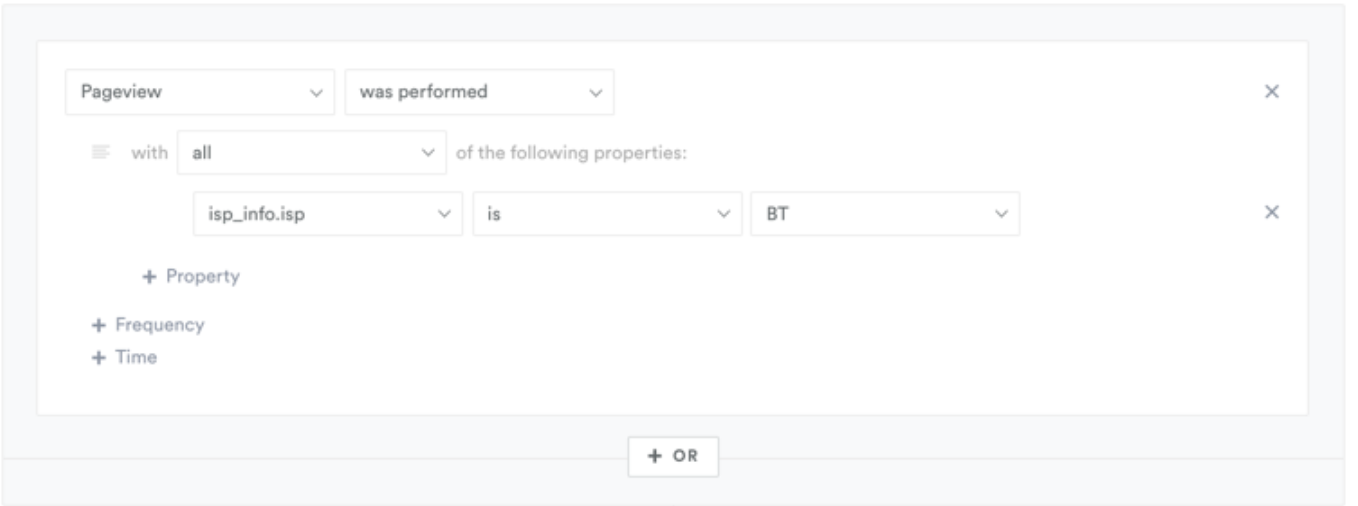
In the Permutive Dashboard, go to *Custom Cohorts* and click *+ Add Cohort*.
In the Cohort Builder, select **Pageview** as your event.
Add a property filter for `isp_info.isp`.
Set the value to the ISP name you want to target (e.g., "BT", "Comcast", "AT\&T").
Optionally add recency, frequency, or other conditions.
Calculate the audience size and save the cohort.
 ## Platform Support
**Mobile SDK limitation:** iOS and Android SDKs do not collect ISP properties automatically. These properties must be manually configured in your SDK implementation.
See the SDK documentation for [iOS](/sdks/mobile/ios) and [Android](/sdks/mobile/android/overview) for instructions on how to enable ISP data collection.
| Platform | ISP Data Available |
| :------- | :---------------------------- |
| Web | Automatic |
| iOS | Manual configuration required |
| Android | Manual configuration required |
| CTV | Manual configuration required |
## Next Steps
Learn cohort creation fundamentals
Return to product overview
## Platform Support
**Mobile SDK limitation:** iOS and Android SDKs do not collect ISP properties automatically. These properties must be manually configured in your SDK implementation.
See the SDK documentation for [iOS](/sdks/mobile/ios) and [Android](/sdks/mobile/android/overview) for instructions on how to enable ISP data collection.
| Platform | ISP Data Available |
| :------- | :---------------------------- |
| Web | Automatic |
| iOS | Manual configuration required |
| Android | Manual configuration required |
| CTV | Manual configuration required |
## Next Steps
Learn cohort creation fundamentals
Return to product overview