> ## Documentation Index
> Fetch the complete documentation index at: https://docs.permutive.com/llms.txt
> Use this file to discover all available pages before exploring further.
# Creating Contextual Cohorts
> How to build audience segments based on page content in Permutive
## Overview
This guide walks you through creating a Contextual Cohort in the Permutive Dashboard. Contextual Cohorts enable you to target ads based on page content without processing user data.
**Prerequisites:**
* Access to the Permutive Dashboard with cohort creation permissions
* Contextual Cohorts enabled in your account
* For Affinity Cohorts: Custom Cohorts created with sufficient consented user engagement data
* Contextual API implemented on your website OR Permutive SDK deployed (the SDK can segment contextual cohorts automatically without direct API implementation)
## Steps
In the Permutive Dashboard, go to *Contextual* and click *+ Add Cohort*.
Give your cohort a descriptive name and optional description.
Choose from:
* **Content Classifications**: Use NLP-generated classifications
* **Page Properties**: Use editorial tags or custom metadata
* **Affinity Cohort**: Target content with high engagement from a specific Custom Cohort
* **Keyword Explorer**: Get AI-powered keyword recommendations for interest-based targeting
Based on the predicate type (see sections below for detailed instructions).
Use *+AND* or *+OR* to add additional conditions and build complex logic.
Preview the estimated pageview reach (if available).
Click *Save* to create the cohort.
**Tip**: While detailed names and descriptions are optional, providing clear, descriptive names and detailed descriptions will enhance your experience when using Permutive's AI products. AI-powered features can better understand and recommend cohorts when they have meaningful context about their purpose and targeting logic.
## Predicate Types
Content Classifications allow you to target based on automated NLP analysis of your content.
To use Content Classifications in a cohort:
1. Select *Content Classifications* as your predicate type
2. Select a **Dimension Type**:
* **Categories**: Topic classifications (requires taxonomy selection)
* **Concepts**: Key themes
* **Entities**: Named entities
* **Keywords**: Important terms
* **Sentiment**: Emotional tone
* **Emotion**: Specific emotions
3. For **Categories**, select the **Taxonomy** (e.g., IAB 2.0, IAB 3.0, BVDW)
4. Choose an **Operator** (e.g., "is", "contains")
5. Enter or select your target **Value**
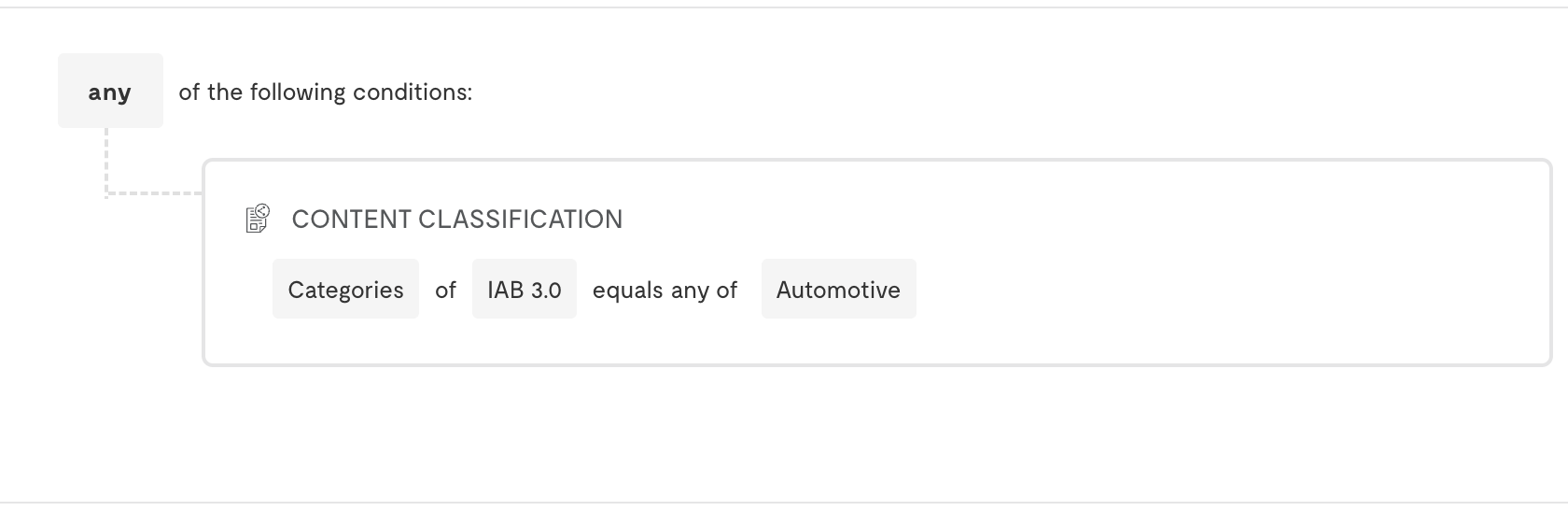 **Example**: Target positive soccer content:
* Dimension: Sentiment
* Operator: is
* Value: positive
* AND Category (IAB 2.0): Sports > Soccer
Page Properties allow you to target based on editorial metadata and custom content attributes.
To use Page Properties in a cohort:
1. Select *Page Properties* as your predicate type
2. Choose a property from the dropdown (e.g., `client.section`, `client.author`, custom properties)
3. Select an operator (e.g., "is", "contains", "is not")
4. Enter the target value
**Example**: Target positive soccer content:
* Dimension: Sentiment
* Operator: is
* Value: positive
* AND Category (IAB 2.0): Sports > Soccer
Page Properties allow you to target based on editorial metadata and custom content attributes.
To use Page Properties in a cohort:
1. Select *Page Properties* as your predicate type
2. Choose a property from the dropdown (e.g., `client.section`, `client.author`, custom properties)
3. Select an operator (e.g., "is", "contains", "is not")
4. Enter the target value
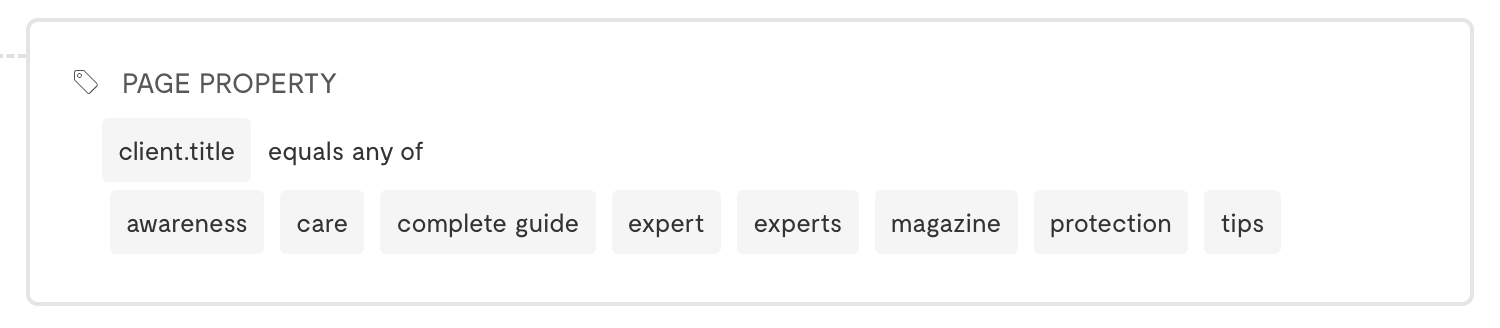 **Example**: Target articles in the "Finance" section with a specific tag:
* Property: `client.section`
* Operator: is
* Value: Finance
* AND Property: `client.tags`
* Operator: contains
* Value: investment
**Available Page Properties**
The Page Properties dropdown includes custom Pageview properties you've defined and standard client properties. If you are implementing the Contextual API directly, you must pass these properties to the API for them to be available for targeting. If the SDK is making the call, it will automatically attach page properties.
Note that enriched properties like ISP and Geo data are not available in Page Properties for Contextual Cohorts.
Affinity Cohorts enable you to target content that shows high engagement from a specific Custom Cohort.
To use Affinity Cohorts:
1. Select *Affinity Cohort* as your predicate type
2. Choose a **Custom Cohort** from the dropdown
3. Select an **Operator** (e.g., "is greater than")
4. Set an **Affinity Score threshold**
**Example**: Target articles in the "Finance" section with a specific tag:
* Property: `client.section`
* Operator: is
* Value: Finance
* AND Property: `client.tags`
* Operator: contains
* Value: investment
**Available Page Properties**
The Page Properties dropdown includes custom Pageview properties you've defined and standard client properties. If you are implementing the Contextual API directly, you must pass these properties to the API for them to be available for targeting. If the SDK is making the call, it will automatically attach page properties.
Note that enriched properties like ISP and Geo data are not available in Page Properties for Contextual Cohorts.
Affinity Cohorts enable you to target content that shows high engagement from a specific Custom Cohort.
To use Affinity Cohorts:
1. Select *Affinity Cohort* as your predicate type
2. Choose a **Custom Cohort** from the dropdown
3. Select an **Operator** (e.g., "is greater than")
4. Set an **Affinity Score threshold**
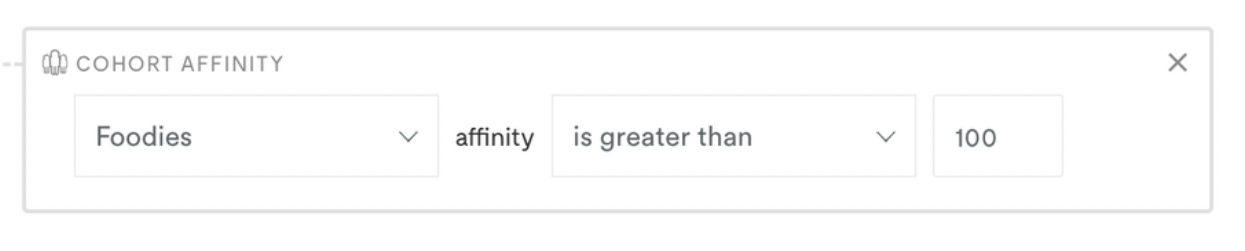 **Example**: Target content with 2x or greater engagement from "Sports Enthusiasts":
* Custom Cohort: Sports Enthusiasts
* Operator: is greater than
* Value: 200
**Affinity Cohort Restrictions**
You can select any Custom Cohort built from first-party behavioral data. However, you **cannot** select:
* Modeled cohorts
* Standard cohorts
* Cohorts using third-party data
**Recommended Starting Threshold**: We generally recommend starting with an affinity score threshold greater than 200 for a good balance of relevance and scale.
## Combining Multiple Conditions
Contextual Cohorts support complex logic by combining multiple predicates:
* Use *+AND* to require all conditions to be met
* Use *+OR* to create alternative paths for targeting
**Example**: Target finance content OR content with high affinity to investors:
* Content Classification: Categories (IAB 2.0) is "Finance"
* OR Affinity Cohort: Investor Cohort is greater than 150
**Example**: Target positive sports articles about soccer:
* Content Classification: Categories (IAB 2.0) is "Sports > Soccer"
* AND Content Classification: Sentiment is "positive"
* AND Page Properties: client.section is "Sports"
## Next Steps
Get AI-powered keyword recommendations
Return to product overview
**Example**: Target content with 2x or greater engagement from "Sports Enthusiasts":
* Custom Cohort: Sports Enthusiasts
* Operator: is greater than
* Value: 200
**Affinity Cohort Restrictions**
You can select any Custom Cohort built from first-party behavioral data. However, you **cannot** select:
* Modeled cohorts
* Standard cohorts
* Cohorts using third-party data
**Recommended Starting Threshold**: We generally recommend starting with an affinity score threshold greater than 200 for a good balance of relevance and scale.
## Combining Multiple Conditions
Contextual Cohorts support complex logic by combining multiple predicates:
* Use *+AND* to require all conditions to be met
* Use *+OR* to create alternative paths for targeting
**Example**: Target finance content OR content with high affinity to investors:
* Content Classification: Categories (IAB 2.0) is "Finance"
* OR Affinity Cohort: Investor Cohort is greater than 150
**Example**: Target positive sports articles about soccer:
* Content Classification: Categories (IAB 2.0) is "Sports > Soccer"
* AND Content Classification: Sentiment is "positive"
* AND Page Properties: client.section is "Sports"
## Next Steps
Get AI-powered keyword recommendations
Return to product overview