> ## Documentation Index
> Fetch the complete documentation index at: https://docs.permutive.com/llms.txt
> Use this file to discover all available pages before exploring further.

# Reporting on a finished campaign

> Summarize how a completed campaign performed, then turn it into a branded post-campaign analysis slide for the client.

export const RailStep = ({step, title, note = '', docLink = '', docPages = '', docTitle = 'From the brief — highlighted for this page', docWide = false}) => <li className={step === '1' ? 'agent-chat-rail-step is-active' : 'agent-chat-rail-step'} data-step={step}>
    <a className="agent-chat-note-title" href={`#step-${step}`}>{title}</a>
    <div className="agent-chat-note-body">
      <div>
        {note.split('`').map((part, i) => i % 2 === 1 ? <a key={i} href={`/api/mcp/${part}`}><code>{part}</code></a> : <span key={i}>{part}</span>)}
        {docLink && <button type="button" className="agent-chat-doc-link" popovertarget={`doc-step-${step}`}>
            {docLink} →
          </button>}
      </div>
    </div>
    {docLink && <div id={`doc-step-${step}`} popover="auto" className={docWide ? 'agent-chat-document agent-chat-document-annotated agent-chat-document-wide' : 'agent-chat-document agent-chat-document-annotated'}>
        <div className="agent-chat-document-header">
          <span>{docTitle}</span>
          <button type="button" popovertarget={`doc-step-${step}`} popovertargetaction="hide" aria-label="Close">✕</button>
        </div>
        <div className="agent-chat-document-pages">
          {docPages.split(';').map(src => src.trim()).filter(Boolean).map((src, i) => <img key={src} src={src} alt={`${docTitle}, part ${i + 1}`} noZoom />)}
        </div>
      </div>}
  </li>;

export const StepRail = ({children}) => <aside className="agent-chat-rail" aria-label="Steps">
    <ol className="agent-chat-rail-list">{children}</ol>
  </aside>;

export const ResponsePart = ({step, title, children}) => <section id={`step-${step}`} className="agent-chat-turn agent-chat-part" data-turn-step={step}>
    <div className="agent-chat-turn-label">{step}. {title}</div>
    {children}
  </section>;

export const AnnotatedTurn = ({step, title, children}) => <section id={`step-${step}`} className="agent-chat-turn" data-turn-step={step}>
    <div className="agent-chat-turn-label">{step}. {title}</div>
    {children}
  </section>;

export const AnnotatedConversation = ({children}) => <div className="agent-chat-conversation">{children}</div>;

export const BarChart = ({title, unit = 'Unique users', data = ''}) => {
  const rows = data.split(';').map(pair => pair.trim()).filter(Boolean).map(pair => {
    const [label, value] = pair.split('=');
    return {
      label: label.trim(),
      value: Number(value)
    };
  });
  const max = Math.max(...rows.map(d => d.value));
  return <div className="agent-chat-chart" role="img" aria-label={title}>
      <div className="agent-chat-chart-caption">
        <div className="agent-chat-chart-title">{title}</div>
        <div className="agent-chat-chart-unit">{unit}</div>
      </div>
      {rows.map(d => <div key={d.label} className="agent-chat-chart-row">
          <span className="agent-chat-chart-label">{d.label}</span>
          <span className="agent-chat-chart-track">
            <span className="agent-chat-chart-bar" style={{
    width: `${d.value / max * 100}%`
  }} />
          </span>
          <span className="agent-chat-chart-value">{d.value.toLocaleString('en-US')}</span>
        </div>)}
    </div>;
};

export const AgentResponse = ({tools = '', skill = '', children}) => <div className="agent-chat-agent">
    {skill && <div className="agent-chat-tools">
        Using skill: <code>{skill}</code>
      </div>}
    {tools && <div className="agent-chat-tools">
        Used Permutive MCP
        {tools.split(',').map(t => t.trim()).filter(Boolean).map((tool, i) => <span key={tool}>
            {i === 0 ? ': ' : ', '}
            <a href={`/api/mcp/${tool}`}><code>{tool}</code></a>
          </span>)}
      </div>}
    <div className="agent-chat-body">{children}</div>
  </div>;

export const UserPrompt = ({children}) => <div className="agent-chat-user">
    <div className="agent-chat-user-bubble">{children}</div>
  </div>;

export const Attachment = ({id, name, kind = '', pages = '', output = false, wide = false, preview = false}) => <div className={output ? 'agent-chat-attachment-row agent-chat-attachment-output' : 'agent-chat-attachment-row'}>
    <button type="button" className={preview ? 'agent-chat-attachment agent-chat-attachment-card' : 'agent-chat-attachment'} popovertarget={id}>
      {preview && <img className="agent-chat-attachment-thumb" src={pages.split(';')[0].trim()} alt={`Preview of ${name}`} noZoom />}
      <span className="agent-chat-attachment-label">
        <span className="agent-chat-attachment-icon" aria-hidden="true">📄</span>
        <span className="agent-chat-attachment-name">{name}</span>
        {kind && <span className="agent-chat-attachment-kind">{kind}</span>}
      </span>
    </button>
    <div id={id} popover="auto" className={wide ? 'agent-chat-document agent-chat-document-wide' : 'agent-chat-document'}>
      <div className="agent-chat-document-header">
        <span>{name}</span>
        <button type="button" popovertarget={id} popovertargetaction="hide" aria-label="Close">✕</button>
      </div>
      <div className="agent-chat-document-pages">
        {pages.split(';').map(src => src.trim()).filter(Boolean).map((src, i) => <img key={src} src={src} alt={`${name}, page ${i + 1}`} noZoom />)}
      </div>
    </div>
  </div>;

<Note>
  The Permutive MCP server is in a **testing phase with partnering customers**.
  Access is invitation-only and the tool interfaces may change. If you would like
  access, please contact your Permutive representative.
</Note>

## Scenario

A campaign has finished, and the advertiser wants to know how it went.

Normally, you would export the campaign's delivery from Google Ad Manager, work
out in a spreadsheet what drove performance, and copy the figures into your
branded post-campaign template by hand.

## How the Permutive MCP server powers the agent

With the Permutive MCP server, your agent is able to automate this by:

* **Pull a campaign's full results** — delivery, CTR and viewability from Google
  Ad Manager, broken down by day, line item and targeted cohort
* **Explain what drove performance** — the agent compares the targeted cohort and
  each line item against the campaign average, so you can see what made the
  difference
* **Produce client-ready output** — following a skill, the agent fills your
  branded slide template and checks the figures reconcile before it does

## Skill: Post Campaign Report

For this scenario, we generated a custom `permutive-post-campaign-report` skill. It tells the agent to:

1. **Gather the campaign's results** — delivery, CTR and viewability, broken down
   by day, line item and targeted cohort
2. **Check the figures reconcile** — daily and line-item totals must match the
   campaign total before anything goes on the slide
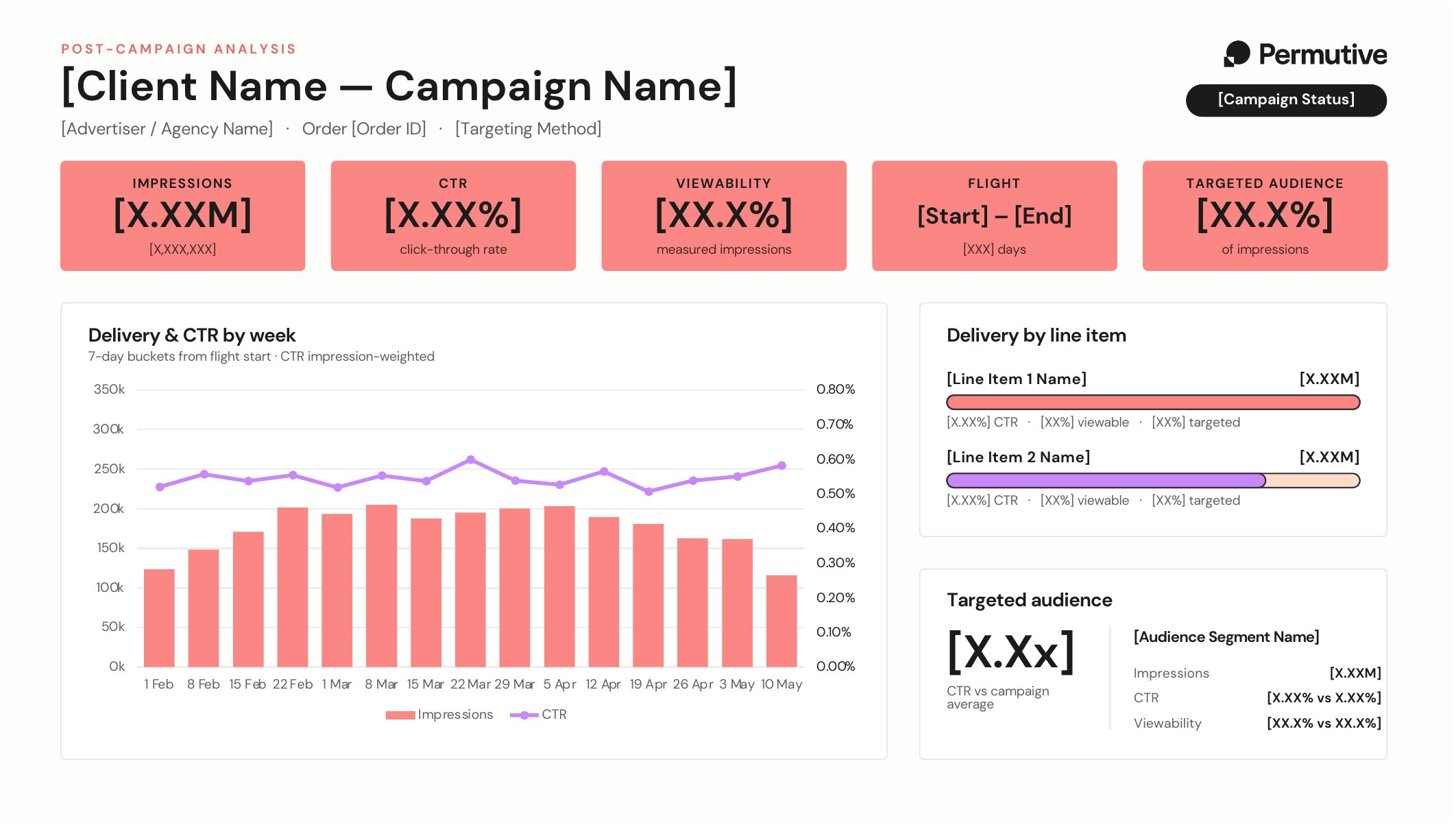
3. **Fill the branded template** — headline figures, weekly delivery and CTR, line
   items and the targeted audience, laid out on one slide
4. **Say what the data can't support** — such as missing cost data, or comparisons
   that are derived rather than measured

We built this skill by asking an agent to write it: we described what our
post-campaign analysis needs to show and gave it our slide template. You can do
the same for your own report format.

<Frame caption="The slide template the skill fills in">
  <img src="https://mintcdn.com/permutive/0s2jO_4HENX6EgC9/images/mcp/use-cases/pca-template.png?fit=max&auto=format&n=0s2jO_4HENX6EgC9&q=85&s=3dd1e12ab16895e71f57db1c5cb12a3c" alt="The post-campaign analysis slide template, with placeholders for each figure" width="2124" height="1200" data-path="images/mcp/use-cases/pca-template.png" />
</Frame>

<Accordion title="About Skills">
  Skills are instructions for your agent that are written once and can then be
  shared across your team. They make sure the same job is done the same way every time.

  Build skills by writing your own instructions, or by asking an agent to write them for you.
  Skills can also include code which allows the agent to do more complicated tasks, such
  as generating a slide deck or spreadsheet, or checking that figures reconcile before they are reported.

  Skills can be used in the following agents:

  * [Claude](https://support.claude.com/en/articles/12512180-using-skills-in-claude)
  * [ChatGPT](https://help.openai.com/en/articles/20001066-skills-in-chatgpt)
  * [Microsoft 365 Copilot](https://learn.microsoft.com/en-us/microsoft-365/copilot/cowork/cowork-customize),
    [PowerPoint](https://support.microsoft.com/en-us/powerpoint/copilot/copilot-in-powerpoint-skills)
    and [Excel](https://support.microsoft.com/en-us/excel/copilot/copilot-in-excel-skills)
  * [Google Gemini](https://support.google.com/gemini/answer/17094296) and
    [Gemini Enterprise](https://docs.cloud.google.com/gemini/enterprise/docs/skills)
</Accordion>

## Example conversation

<AnnotatedConversation>
  <StepRail>
    <RailStep step="1" title="Ask for a summary" note="Name the campaign as you'd say it. The agent finds the finished campaign from a partial name." />

    <RailStep step="2" title="The agent summarizes the campaign" note="The agent finds the campaign with `list_campaigns` and reads its delivery with `get_campaign`: headline figures, a monthly chart, the targeted cohort and each line item, with what explains the differences." />

    <RailStep step="3" title="Ask for the slide" note="Start the post-campaign report skill with its slash command. The conversation so far already identifies the campaign, so a short instruction is enough." />

    <RailStep step="4" title="The agent checks the figures" note="Before building anything, the agent reconciles the daily and line-item figures against the campaign total, so nothing on the slide is unaccounted for." />

    <RailStep step="5" title="The slide" note="A one-slide PowerPoint deck in your brand, ready to send. Click the preview to see it full size." docLink="See the template it fills in" docPages="/images/mcp/use-cases/pca-template.png" docTitle="The slide template the skill fills in" docWide />
  </StepRail>

  <AnnotatedTurn step="1" title="Ask for a summary">
    <UserPrompt>
      Give me a summary of the performance of the Summit campaign that finished in
      Permutive
    </UserPrompt>
  </AnnotatedTurn>

  <AnnotatedTurn step="2" title="The agent summarizes the campaign">
    <AgentResponse tools="list_campaigns, get_campaign">
      **Summit Sportswear — Playoff Series** (agency: Northwind Media Group) ran 1 Feb – 15 May 2026 and is now closed.

      **Headline delivery**

      * 2,640,000 impressions
      * 0.55% CTR
      * 66.0% viewability

      Delivery ramped through February, peaked in March (\~28.2k/day average, high of 38,210 on 31 March), then tapered off through the final fortnight.

      <BarChart title="Summit Sportswear — impressions by month" unit="Impressions" data="Feb=644799; Mar=874947; Apr=806160; May (1–15)=314094" />

      **Targeting**

      One Permutive cohort was targeted: *Sports Fans — regular readers (7d)*. It carried 1.91M impressions (72% of the order) at a 0.68% CTR — a CTR index of 1.24, so about 24% above the campaign average — and 68% viewability. That audience sits entirely in the Quorrane Media US workspace (\~7.2M available users), so nothing was drawn from EU or APAC.

      **Line items**

      | | Impressions | Targeted | CTR | Viewability |
      | - | - | - | - | - |
      | Live Blog Companion | 1,490,000 | 1,241,000 (83%) | 0.62% | 69% |
      | Video Pre-Roll | 1,150,000 | 669,000 (58%) | 0.46% | 62% |

      The Live Blog Companion line was the clear performer on both CTR and viewability, and it was also the better-targeted of the two. Video Pre-Roll delivered nearly as much volume but only 58% of it hit the targeted cohort, which is most of the reason the campaign average sits below the cohort's own 0.68%.

      I can turn this into a branded one-slide PCA deck for Northwind if you want something client-facing.
    </AgentResponse>
  </AnnotatedTurn>

  <AnnotatedTurn step="3" title="Ask for the slide">
    <UserPrompt>
      `/permutive-post-campaign-report` Generate me a PCA slide
    </UserPrompt>
  </AnnotatedTurn>

  <AgentResponse skill="permutive-post-campaign-report" tools="get_campaign">
    <ResponsePart step="4" title="The agent checks the figures">
      Built from order 3795585517, **Summit Sportswear — Playoff Series** (Northwind Media Group, 1 Feb – 15 May 2026).

      Both reconciliation checks came back clean: the 104 daily rows and the two line items each sum to exactly 2,640,000, so nothing is unaccounted for.
    </ResponsePart>

    <ResponsePart step="5" title="The slide">
      <Attachment id="pca-slide" name="Post campaign analysis.pptx" kind="PPTX" pages="/images/mcp/use-cases/pca-summit-sportswear.png" output wide preview />
    </ResponsePart>
  </AgentResponse>
</AnnotatedConversation>

## Tips

* **Ask for the summary first**: Going through the figures in conversation before
  generating the slide means anything surprising is explained before it reaches
  the client.


This documentation is built and hosted on [Mintlify](https://mintlify.com), a developer documentation platform.